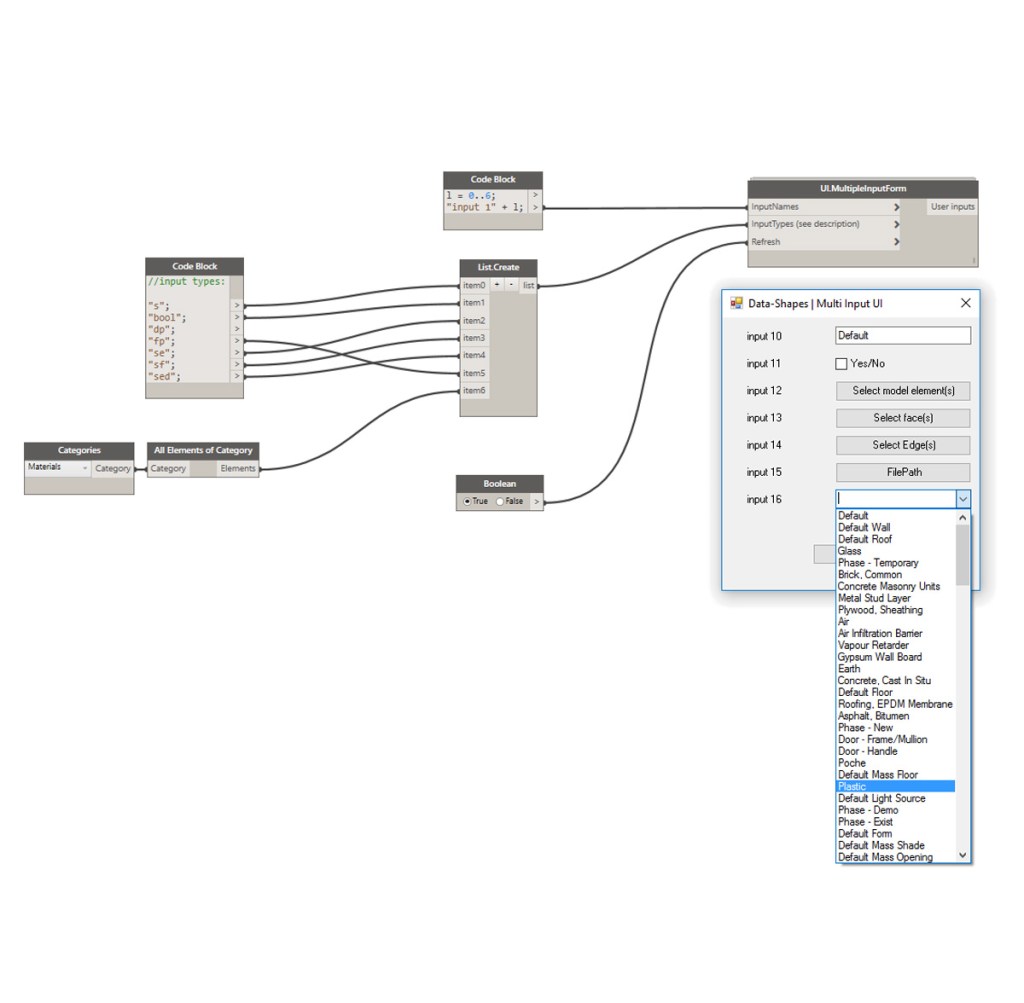
- I hesitated between updating the previous post directly or posting a new post. I finally decided to make it a new post so that it’s not too long to read. I will only develop on new stuff here.
I have updated the UI.MultipleInputForm so it could handle more input types:

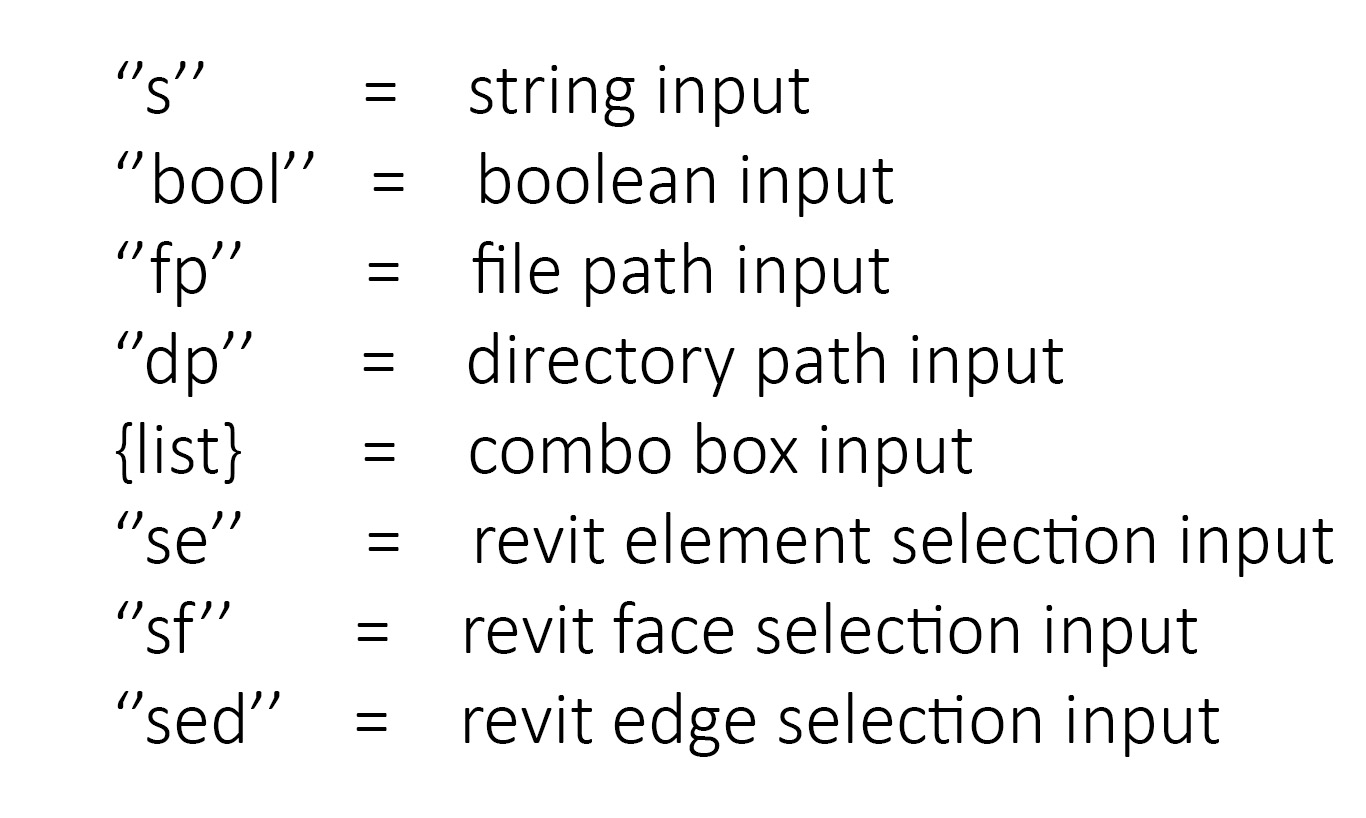
Here is the Input type codification:
1. Revit Selection Inputs:
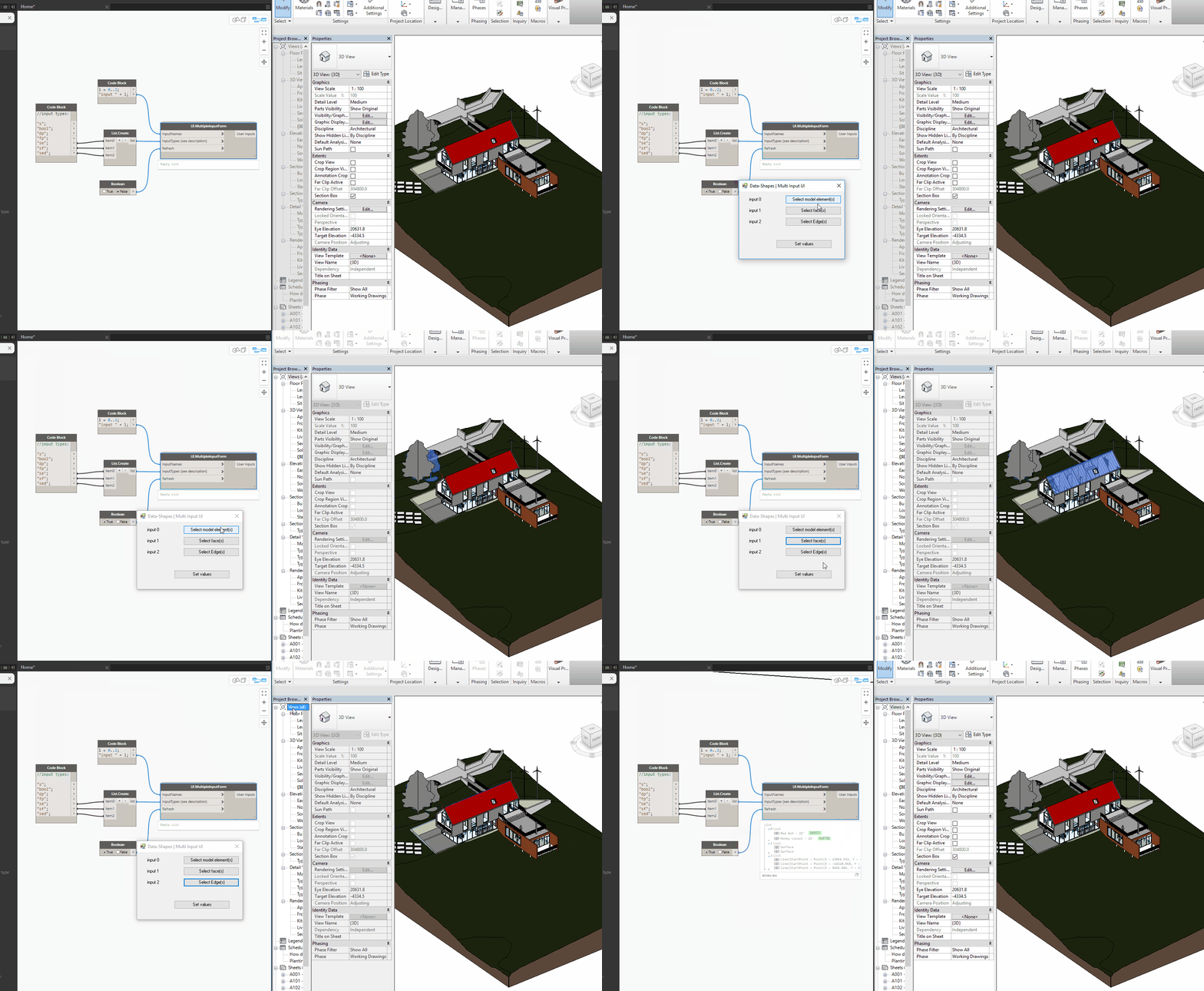
The Revit element, face, and edge selection inputs are pretty straight forward. These type of inputs generate a button that allows interaction with the Revit model. The selections are then output as lists. Here is an example with the “se” (select Revit element) input type:
2. ComboBox Inputs:
String and Number lists:
The combo box is the only input that needs special treatment, because there is no codification. In order to create a drop-down list input in the form, you just need to feed your drop down list items as a one level nested list within the InputTypes list. The list structure is very important here. The List.Create Node is perfect for creating the right input:
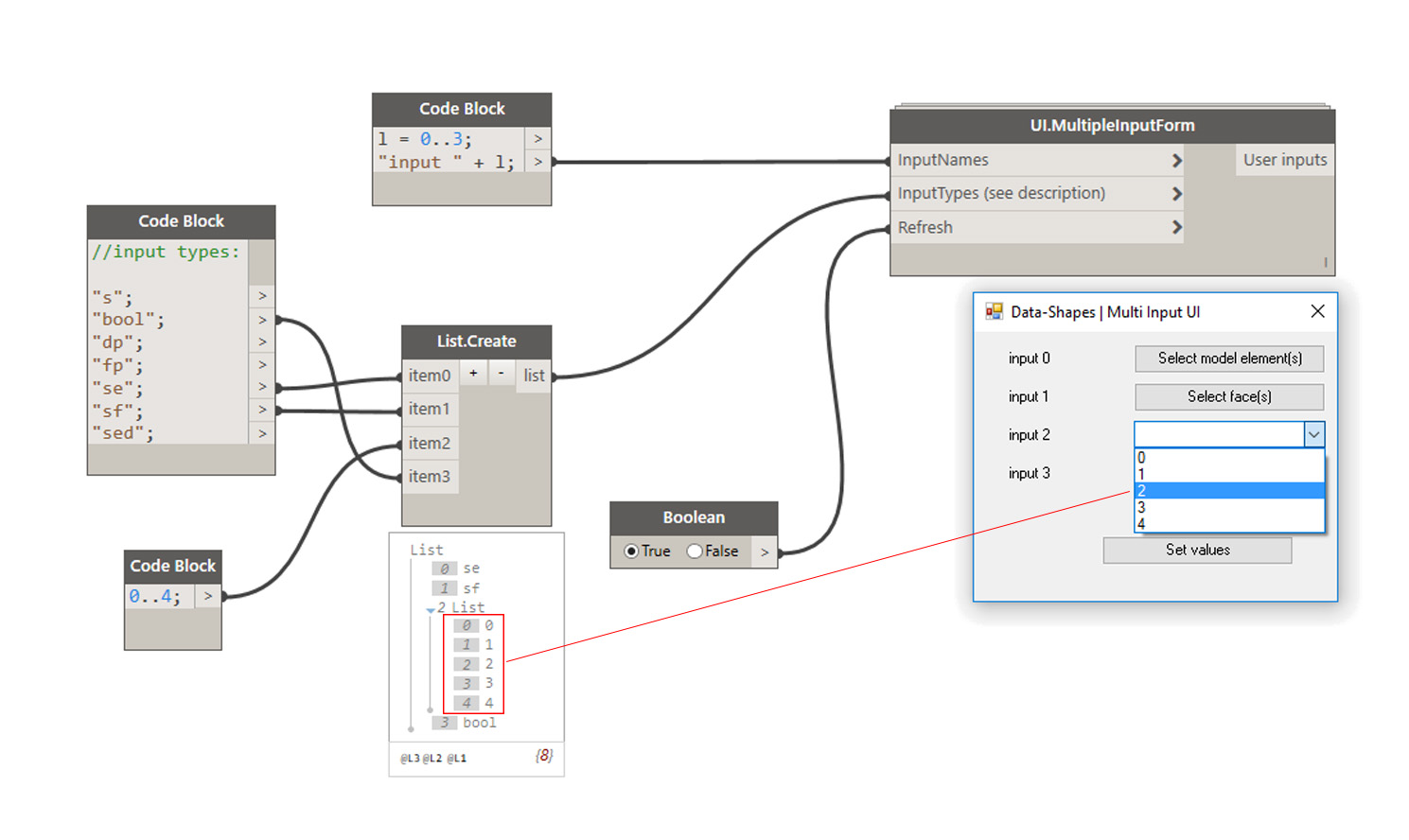
You can- of course- add as many drop down lists as you want:

Revit Element lists:
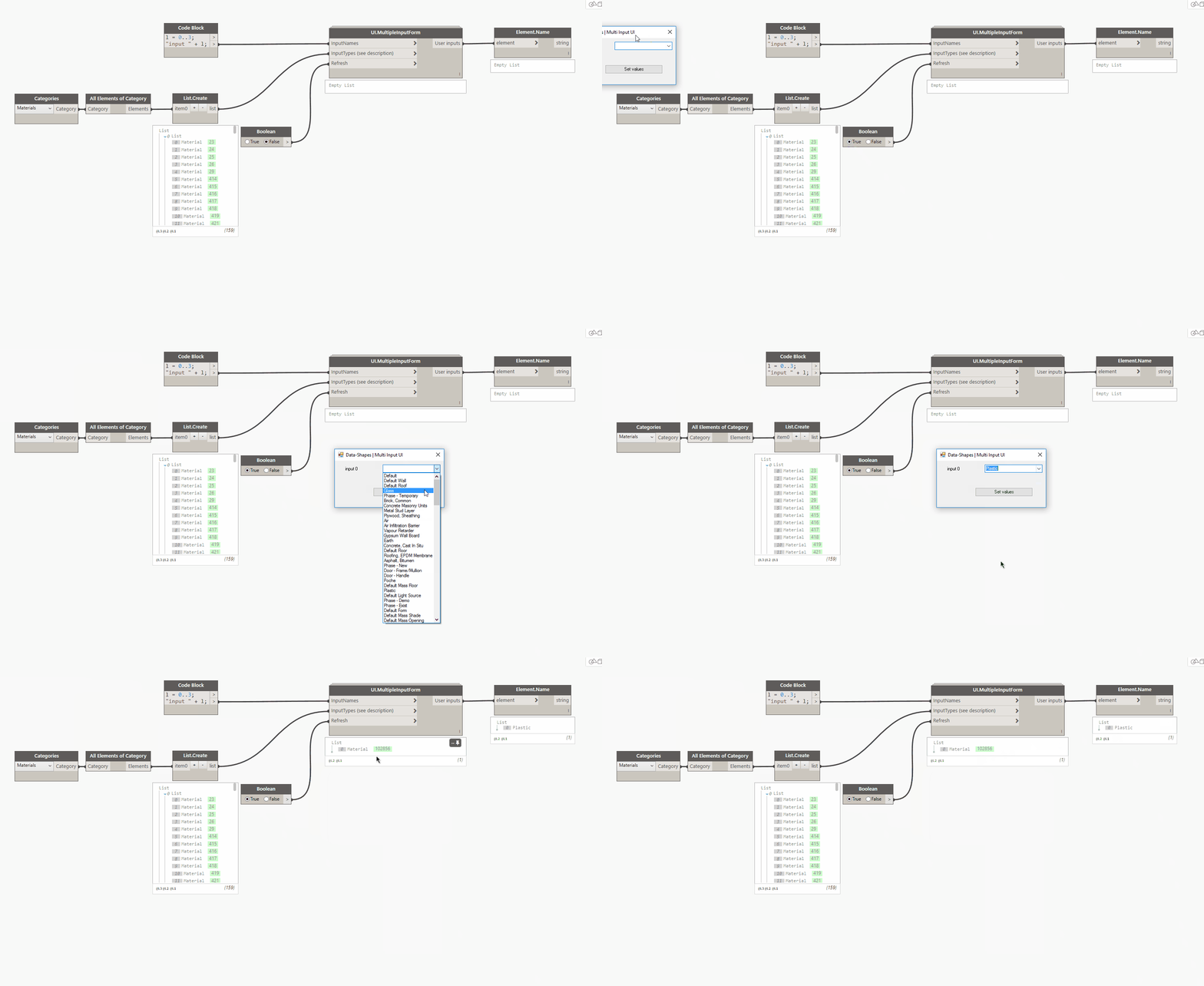
In case you use Revit elements as items for your drop down list, the node will display the name of the elements, and return the Revit element as an output:
3. Form features:
I have also added a couple of features to the form. I followed Brendan Cassidy’s example and deleted the maximise/minimise and resize options. I also set the form so that it would always be in the forefront, this way it will never be hidden which could prevent Dynamo and Revit from working.
This node should make it a little easier for those allergic to Dynamo to benefit from its power!
Here’s the code to the node:
This file contains hidden or bidirectional Unicode text that may be interpreted or compiled differently than what appears below. To review, open the file in an editor that reveals hidden Unicode characters.
Learn more about bidirectional Unicode characters
| #Copyright (c) mostafa el ayoubi , 2016 | |
| #Data-Shapes http://www.data-shapes.net , elayoubi.mostafa@gmail.com | |
| import clr | |
| clr.AddReference('System.Windows.Forms') | |
| clr.AddReference('System.Drawing') | |
| from System.Drawing import Point | |
| from System.Windows.Forms import Application, Button, Form, Label, TextBox, CheckBox, FolderBrowserDialog, OpenFileDialog, DialogResult, ComboBox, FormBorderStyle | |
| from System.Collections.Generic import * | |
| clr.AddReference('RevitAPIUI') | |
| from Autodesk.Revit.UI import Selection | |
| clr.AddReference('RevitNodes') | |
| import Revit | |
| clr.ImportExtensions(Revit.Elements) | |
| clr.ImportExtensions(Revit.GeometryConversion) | |
| clr.AddReference('RevitServices') | |
| from RevitServices.Persistence import DocumentManager | |
| doc = DocumentManager.Instance.CurrentDBDocument | |
| uidoc = DocumentManager.Instance.CurrentUIApplication.ActiveUIDocument | |
| class MultiTextBoxForm(Form): | |
| def __init__(self): | |
| self.Text = 'Data-Shapes | Multi Input UI' | |
| self.output = [] | |
| self.values = [] | |
| def setclose(self, sender, event): | |
| cbindexread = 0 | |
| for f in self.output: | |
| if f.GetType() == TextBox: | |
| self.values.append(f.Text) | |
| if f.GetType() == CheckBox: | |
| self.values.append(f.Checked) | |
| if f.GetType() == Button: | |
| if f.Tag == None : | |
| self.values.append(f.Text) | |
| else: | |
| self.values.append(f.Tag) | |
| if f.GetType() == ComboBox: | |
| self.values.append(globals() ['dict%d'%(cbindexread)][f.Text]) | |
| cbindexread += 1 | |
| self.Close() | |
| def reset(self, sender, event): | |
| pass | |
| def openfile(self, sender, event): | |
| ofd = OpenFileDialog() | |
| dr = ofd.ShowDialog() | |
| if dr == DialogResult.OK: | |
| sender.Text = ofd.FileName | |
| def opendirectory(self, sender, event): | |
| fbd = FolderBrowserDialog() | |
| dr = fbd.ShowDialog() | |
| if dr == DialogResult.OK: | |
| sender.Text = fbd.SelectedPath | |
| def pickobjects(self, sender, event): | |
| sel = uidoc.Selection.PickObjects(Selection.ObjectType.Element,'') | |
| selelem = [doc.GetElement(s.ElementId) for s in sel] | |
| sender.Tag = (selelem) | |
| def pickfaces(self, sender, event): | |
| selface = uidoc.Selection.PickObjects(Selection.ObjectType.Face,'') | |
| faces = [uidoc.Document.GetElement(s).GetGeometryObjectFromReference(s).ToProtoType(True) for s in selface] | |
| sender.Tag = [i for f in faces for i in f] | |
| def pickedges(self, sender, event): | |
| seledge = uidoc.Selection.PickObjects(Selection.ObjectType.Edge,'') | |
| edges = [uidoc.Document.GetElement(s).GetGeometryObjectFromReference(s).AsCurve().ToProtoType(True) for s in seledge] | |
| sender.Tag = edges | |
| def topmost(self): | |
| self.TopMost = True | |
| form = MultiTextBoxForm() | |
| form.topmost() | |
| xlabel = 25 | |
| xinput = 125 | |
| y = 10 | |
| fields = [] | |
| error = 0 | |
| cbindex = 0 | |
| #Input form | |
| if isinstance(IN[0],list): | |
| inputnames = IN[0] | |
| else: | |
| inputnames = [IN[0]] | |
| if isinstance(IN[1],list): | |
| inputtypes = IN[1] | |
| else: | |
| inputtypes = [IN[1]] | |
| for i,j in zip(inputnames,inputtypes): | |
| label = Label() | |
| label.Location = Point(xlabel,y+4) | |
| label.Height = 20 | |
| label.Width = 80 | |
| label.Text = str(i) | |
| form.Controls.Add(label) | |
| if isinstance(j,list): | |
| cb = ComboBox() | |
| cb.Location = Point(xinput,y) | |
| cb.Width = 150 | |
| globals()['dict%d'%(cbindex)] = {} | |
| try : | |
| for k in j: | |
| globals()['dict%d'%(cbindex)][k.Name] = k | |
| cb.Items.Add(k.Name) | |
| except : | |
| for k in j: | |
| try: | |
| globals()['dict%d'%(cbindex)][str(k)] = k | |
| except: | |
| globals()['dict%d'%(cbindex)][k.encode('utf-8').decode('utf-8')] = k | |
| cb.Items.Add(k) | |
| form.Controls.Add(cb) | |
| form.output.append(cb) | |
| cbindex += 1 | |
| elif j == 's': | |
| tb = TextBox() | |
| tb.Text = 'Default' | |
| tb.Width = 150 | |
| tb.Location = Point(xinput,y) | |
| form.Controls.Add(tb) | |
| form.Controls.Add(label) | |
| form.output.append(tb) | |
| elif j == 'bool': | |
| yn = CheckBox() | |
| yn.Location = Point(xinput,y) | |
| yn.Text = 'Yes/No' | |
| form.Controls.Add(yn) | |
| form.output.append(yn) | |
| elif j == 'fp': | |
| fp = Button() | |
| fp.Width = 150 | |
| fp.Text = 'FilePath' | |
| fp.Location = Point(xinput,y) | |
| form.Controls.Add(fp) | |
| fp.Click += form.openfile | |
| form.output.append(fp) | |
| elif j == 'dp': | |
| dp = Button() | |
| dp.Width = 150 | |
| dp.Text = 'DirectoryPath' | |
| dp.Location = Point(xinput,y) | |
| form.Controls.Add(dp) | |
| dp.Click += form.opendirectory | |
| form.output.append(dp) | |
| elif j == 'se': | |
| se = Button() | |
| se.Width = 150 | |
| se.Text = 'Select model element(s)' | |
| se.Location = Point(xinput,y) | |
| form.Controls.Add(se) | |
| se.Click += form.pickobjects | |
| form.output.append(se) | |
| elif j == 'sf': | |
| sf = Button() | |
| sf.Width = 150 | |
| sf.Text = 'Select face(s)' | |
| sf.Location = Point(xinput,y) | |
| form.Controls.Add(sf) | |
| sf.Click += form.pickfaces | |
| form.output.append(sf) | |
| elif j == 'sed': | |
| sed = Button() | |
| sed.Width = 150 | |
| sed.Text = 'Select Edge(s)' | |
| sed.Location = Point(xinput,y) | |
| form.Controls.Add(sed) | |
| sed.Click += form.pickedges | |
| form.output.append(sed) | |
| else : | |
| error = 'One or more input types are invalid, visit http://www.data-shapes.net for more informations' | |
| y+= 30 | |
| button = Button() | |
| button.Text = 'Set values' | |
| button.Width = 150 | |
| button.Location = Point (100,y+30) | |
| button.Click += form.setclose | |
| form.Controls.Add(button) | |
| form.MaximizeBox = False | |
| form.MinimizeBox = False | |
| form.FormBorderStyle = FormBorderStyle.FixedSingle | |
| form.Height = y + 120 | |
| if error == 0 and IN[2] == True: | |
| Application.Run(form) | |
| result = form.values | |
| OUT = result,True | |
| elif IN[2] == False: | |
| result = "Set toggle to true!" | |
| OUT = result,False |



 data|shapes
Leave a comment