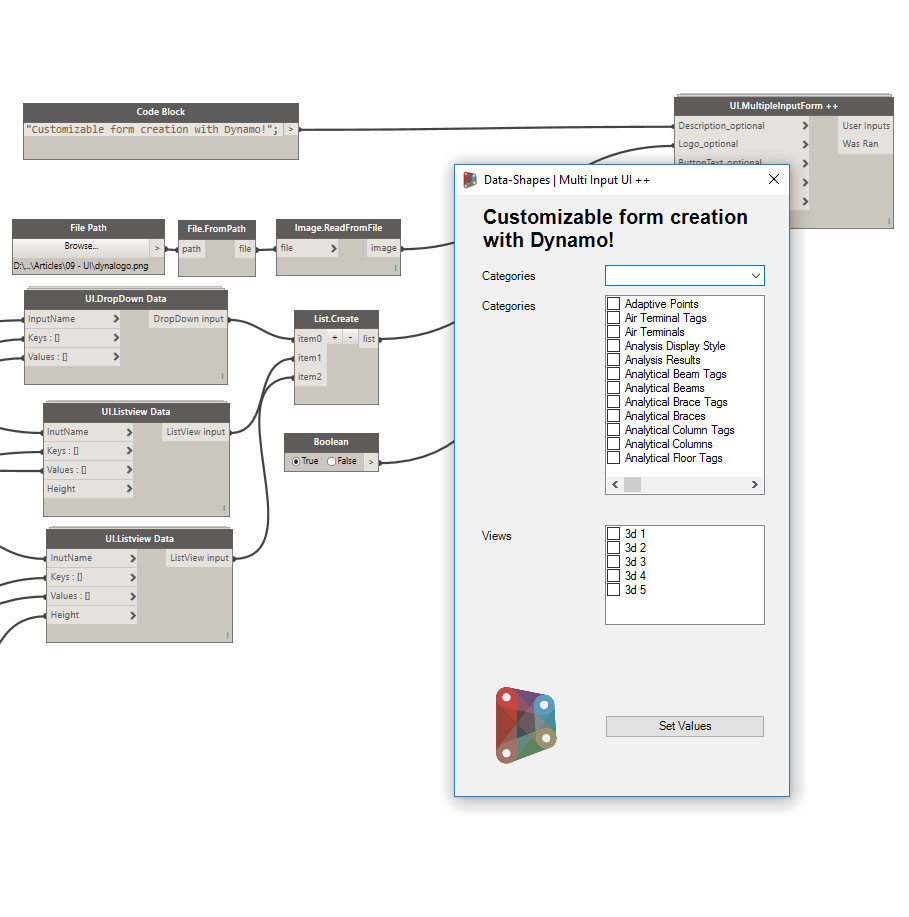
Those who have paid attention to my previous post might have noticed that there was a new Form creation node in the Data-Shapes package called “UI.MultipleInputForm++” .
Edit: all the forms of the Data-Shapes Package now handle all screen resolution.
The UI.MultipleInputForm++ node may have the exact same purpose as the previous UI.MultipleInputForm (which still works like this), but it allows more customization and offers the possibility to use ListView inputs. Here’s how it works :
What is new :
This new node has more inputs than UI.MultipleInputForm :
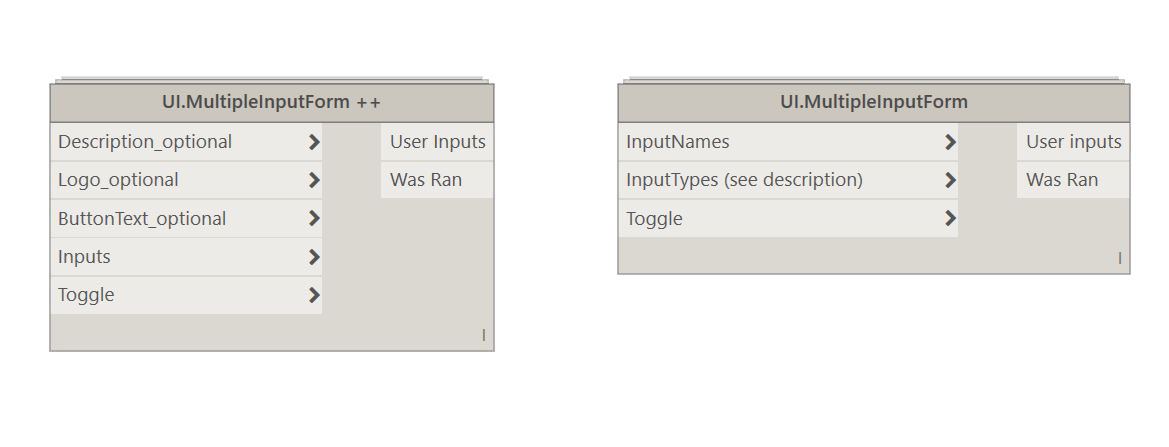
let’s go through the function of each input :
- Description input (optional): the description input allows to add a description of what the workflow does at to top of the form :
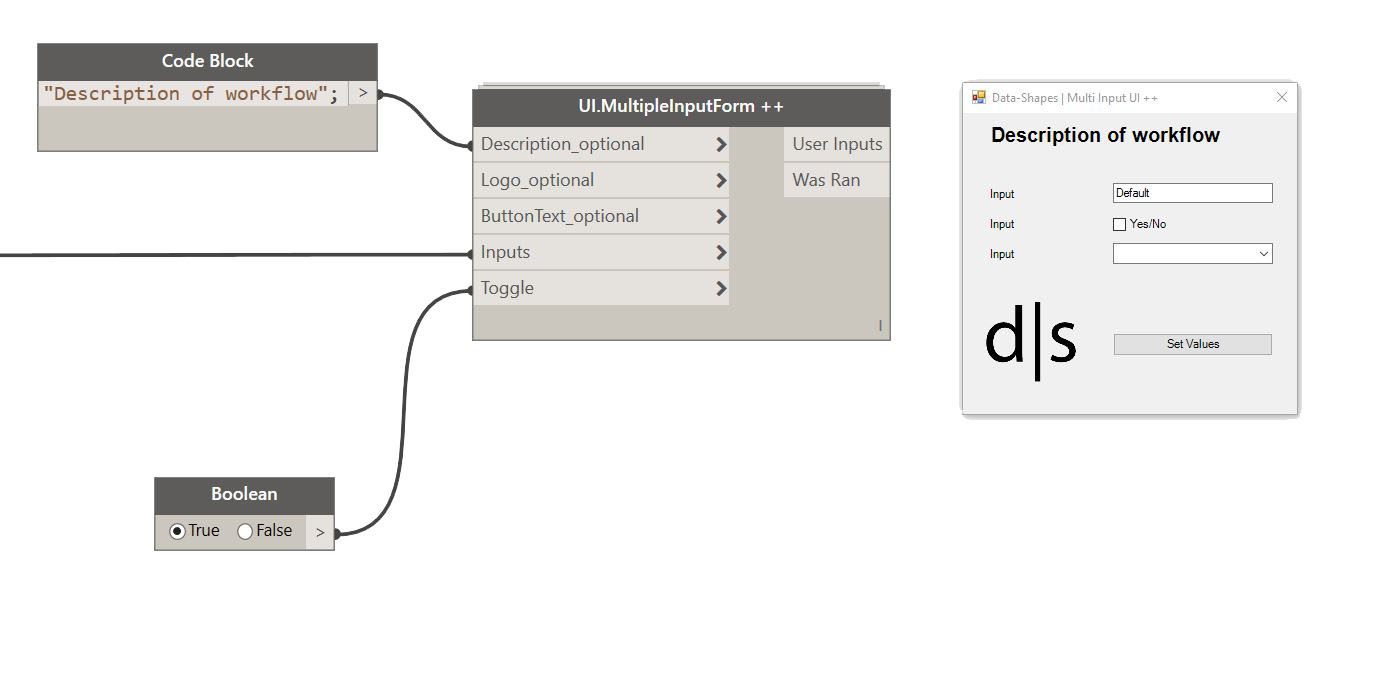
The description is optional, in case you don’t add any input it will create a form without a header:
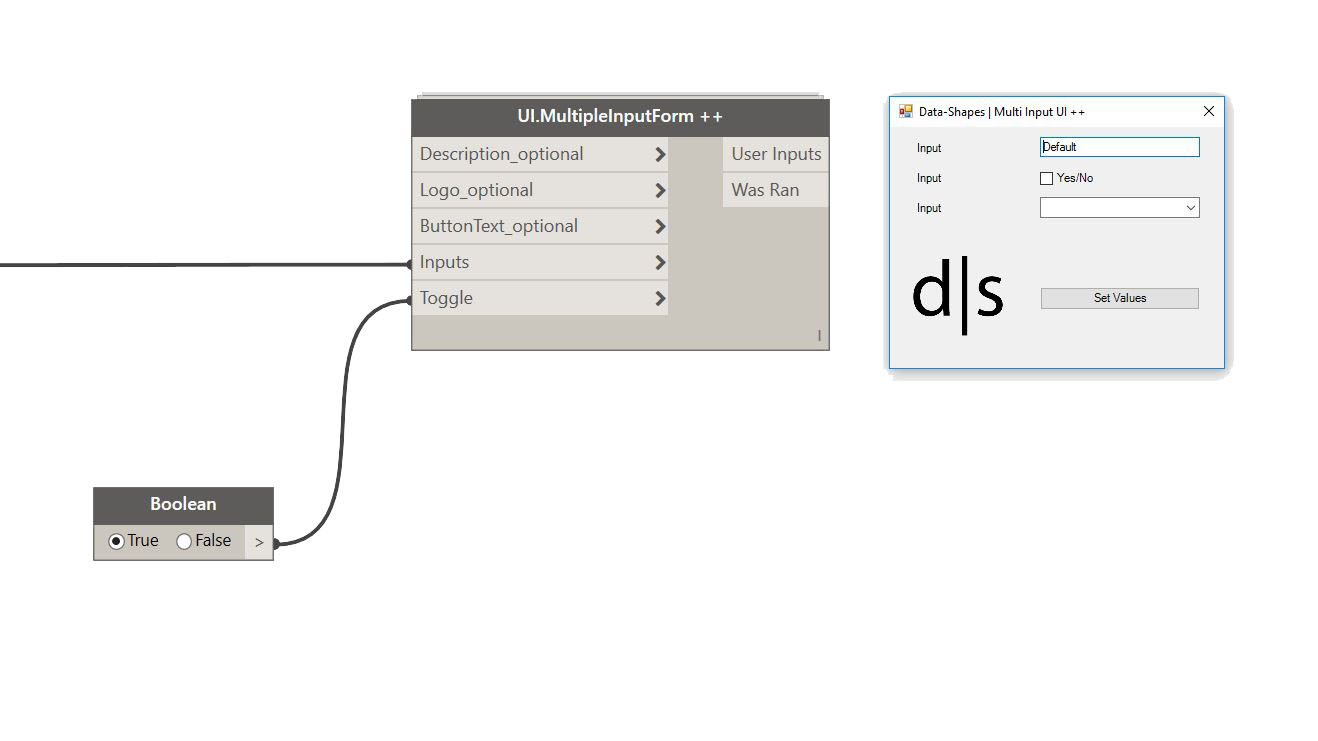
- The Logo input (optional): This input allows to add your personnal logo at the bottom left of the form. The input must be an image. You don’t have to worry about the resolution or the size of your logo, the code has been made in such way that it will be automatically resized. You can obtain image inputs using filepath, File.FromPath and Image.ReadFromFile nodes. Your custon logo will also be converted to an icon and override the window icon :
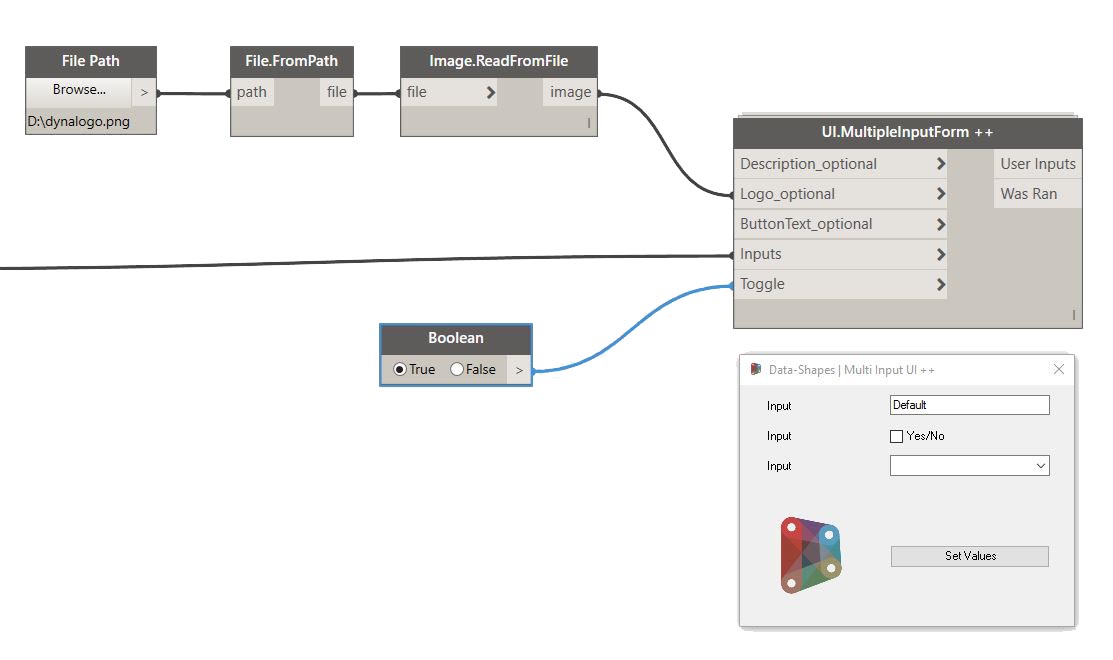
The logo input is optional. In case you don’t add an image input, you’ll see the default Data-Shapes logo.
- Button Text input (optional): UI.MultipleFormInput++ is all about customization! The “ButtonText” input allows you to change the text on the Form validation button:

This input is optional too and the default ButtonText value is “Set Values”.
The inputs:
UI.MultipleInputForm++ has a very different way to take inputs than UI.MultipleInputForm. Setting the user inputs asks for a little more work but it allows more flexibility and, once again, costumization. Let’s go through all the types of input:
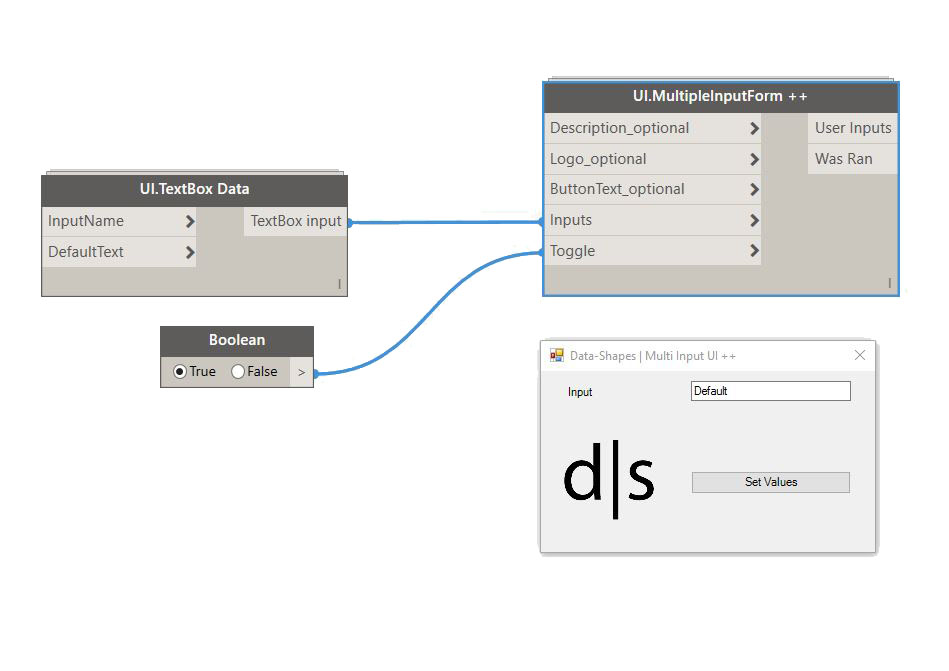
- TextBox input: In order to add a textbox input the form, you need to use the “UI.TextBox Data” node. This new method of creation allows to set the text box label and also the default value :

In case you don’t specify an InputName and DefaultText, a generic TextBox will be created :
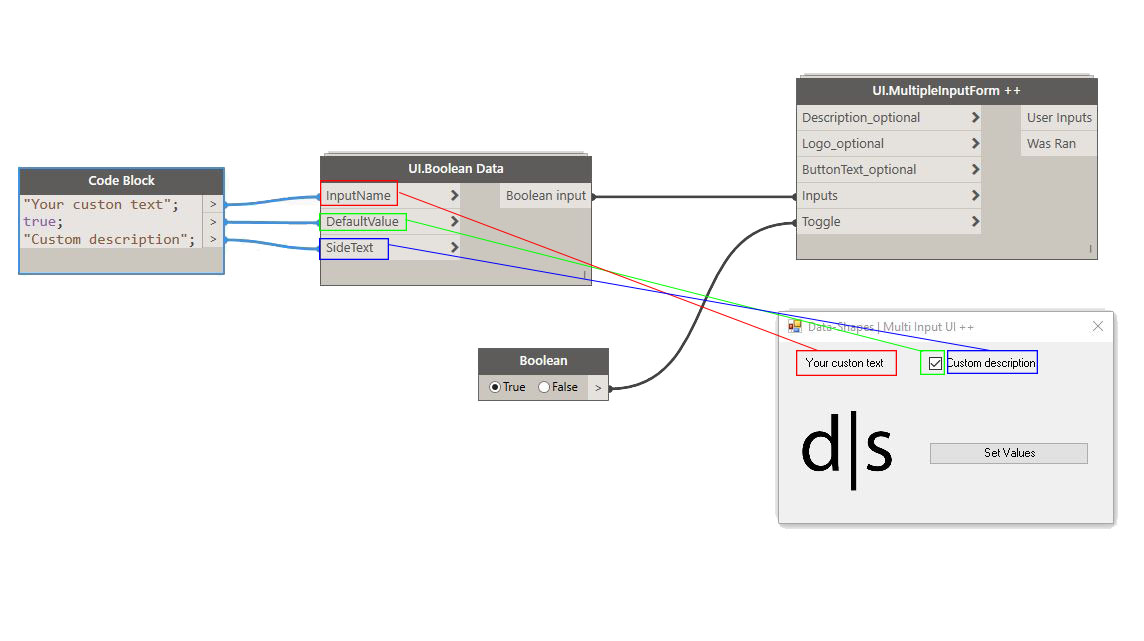
- Boolean input : Boolean inputs can be added in a similar way, using the “UI.Boolean Data” node. Here too you can set the InputName and Default Value, or create a generic boolean input:
- Filepath and DirectoryPath inputs : You will need “UI.FilePath Data” and “UI.DirectoryPath Data” nodes to add FilePaths and DirectoryPaths to the form. Once again you can customize the input label and also the default value if you want to:
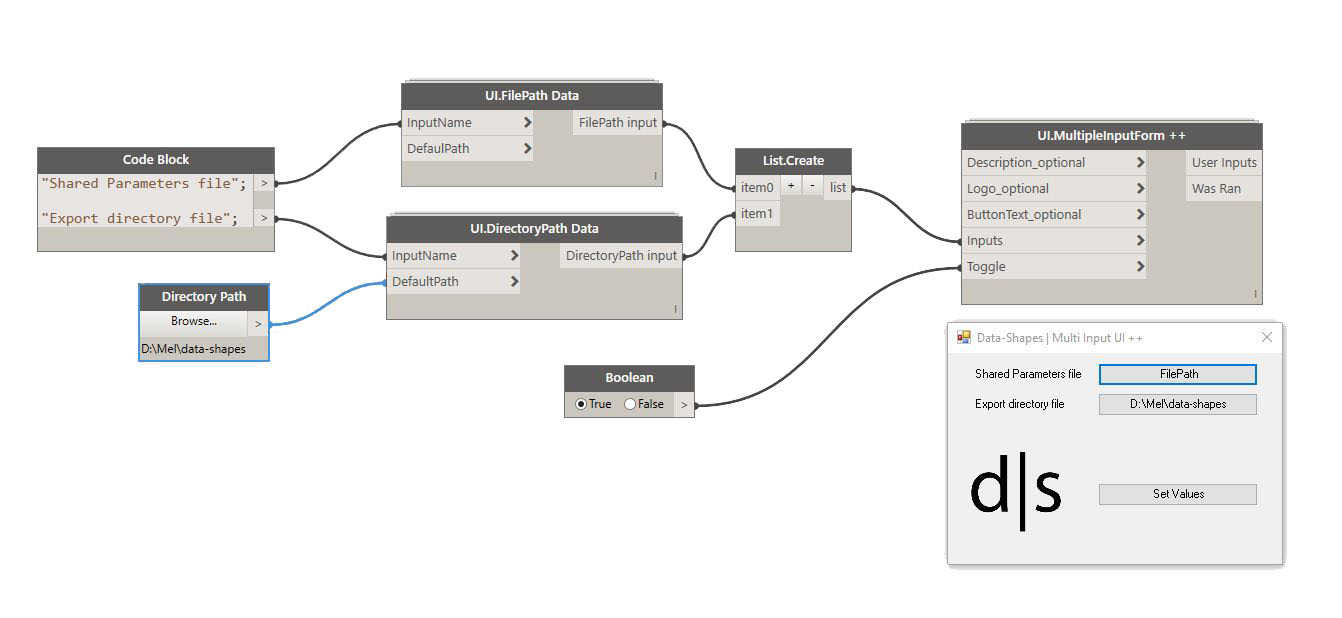
In case you don’t enter default values, the buttons will read “FilePath” and “DirectoryPath”.
- Revit selection inputs : For those types of input, you’ll need “UI.SelectModelElements Data”, “UI.SelectFaces Data” and “UI.SelectEdges Data” nodes. You can set the input label and the text that will be written on the buttons. If you don’t specify anything, generic texts (“Input”, “Select Face(s)”…) will be used.

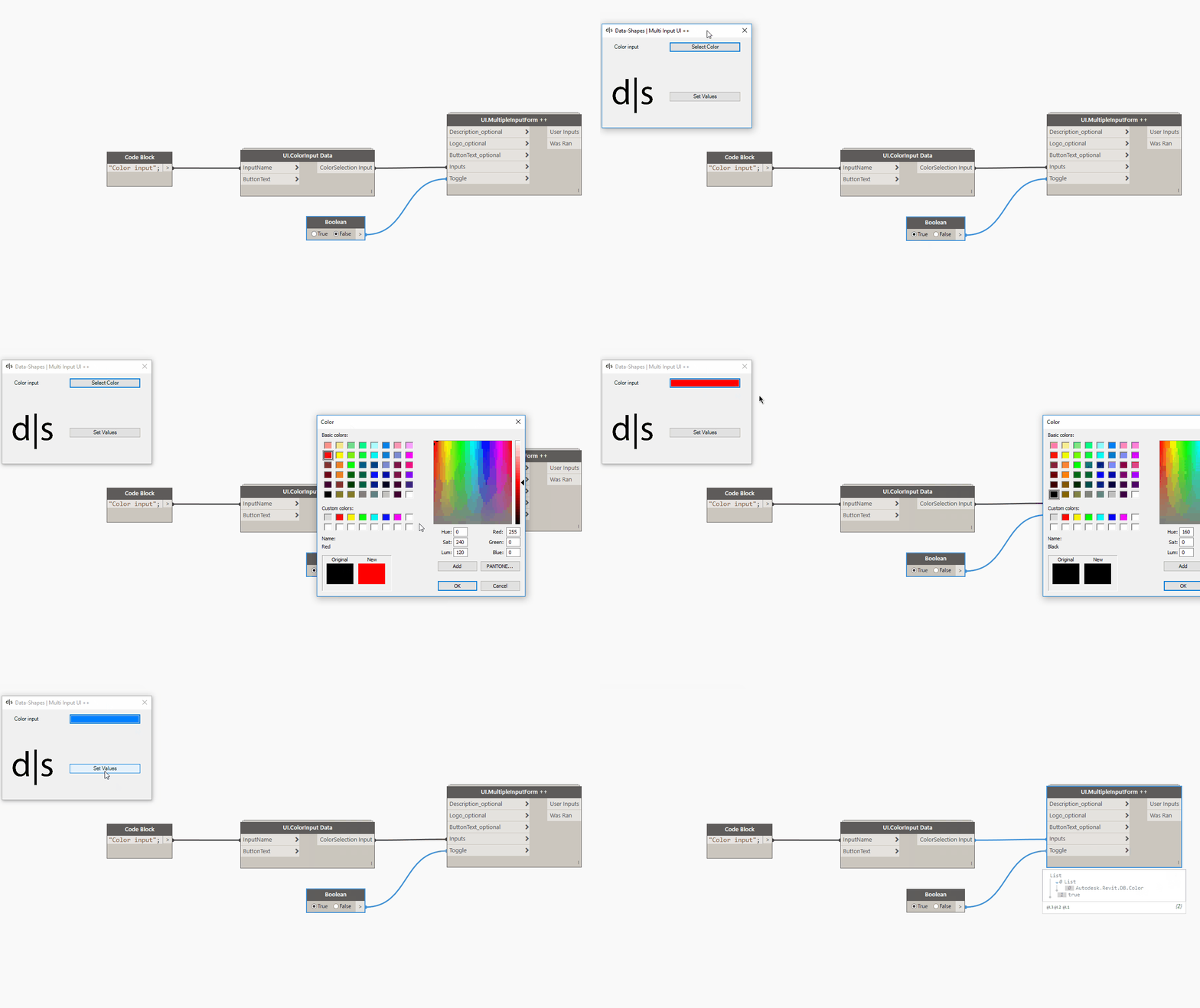
- Color selection input – Only with Revit 2017: In order to add a color selection input to the form, you need to use UI.ColorSelection Data. — This input was inspired by Adrien_P’s comment on my previous post, which I think is great. This kind of interaction is really what I intended this blog to be about.– It uses the same method as Rhythm’s UI.ColorPicker by John Pierson. It calls the UI colors selection interface directly from a form button. Here too you can specify the label and button texts :
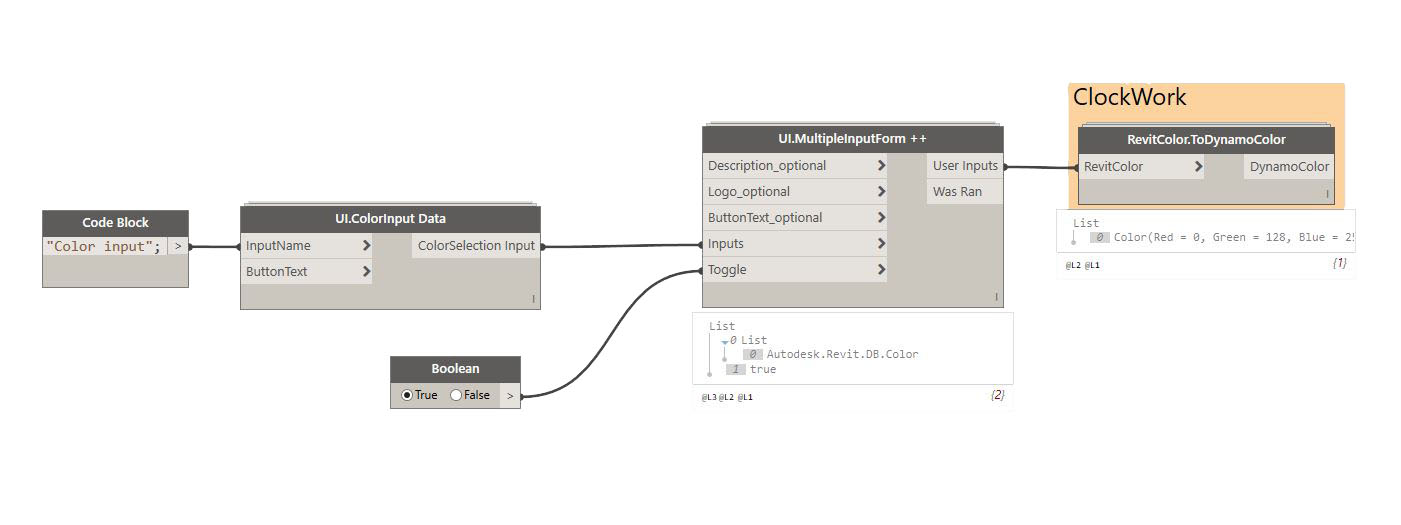
The form outputs a revit colour so, in case you need it, you can use Clockwork’s RevitColor.ToDynamoColor to convert it:
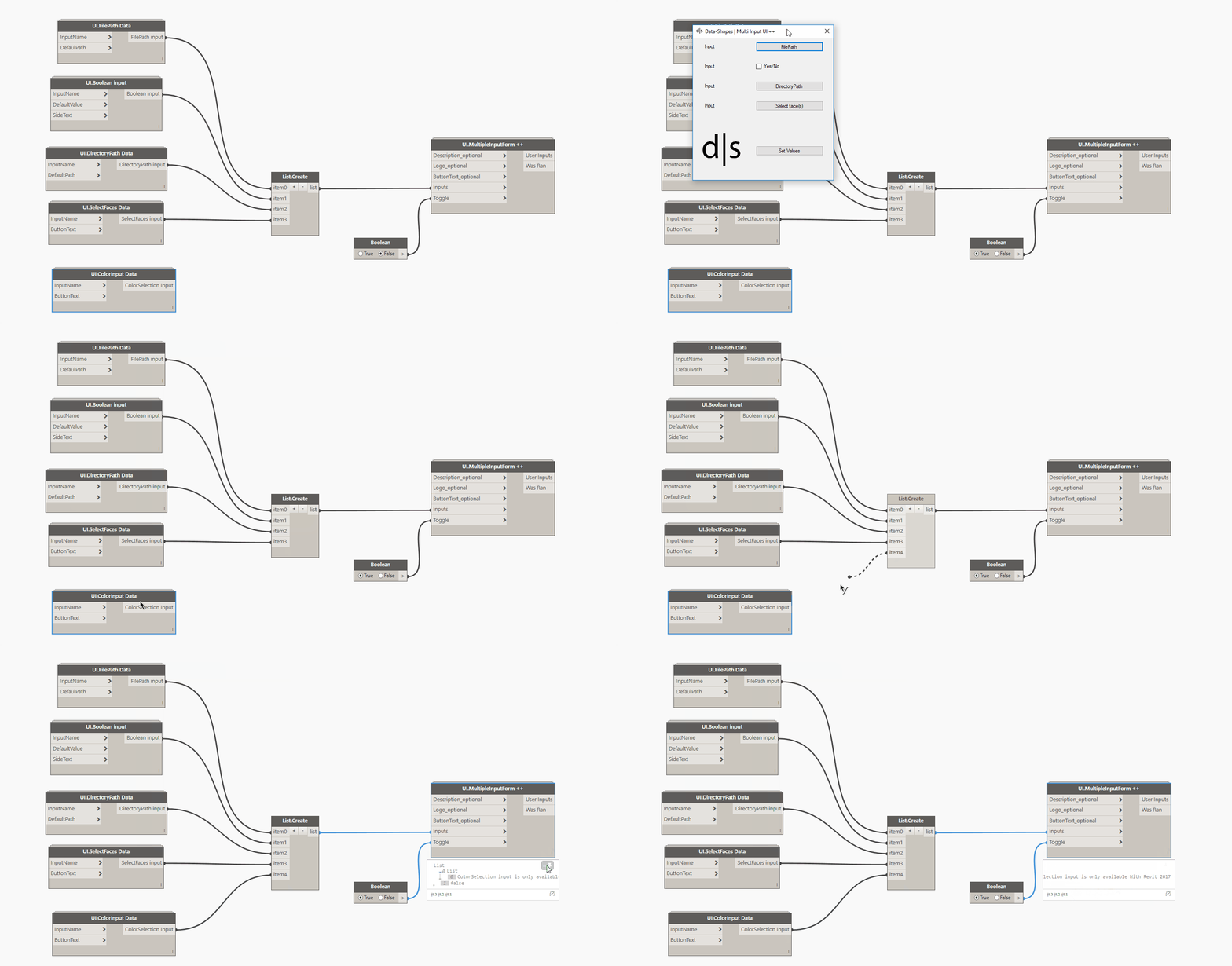
When used with Revit 2016 or previous version, you’ll get this message if you try and add a ColorInput :
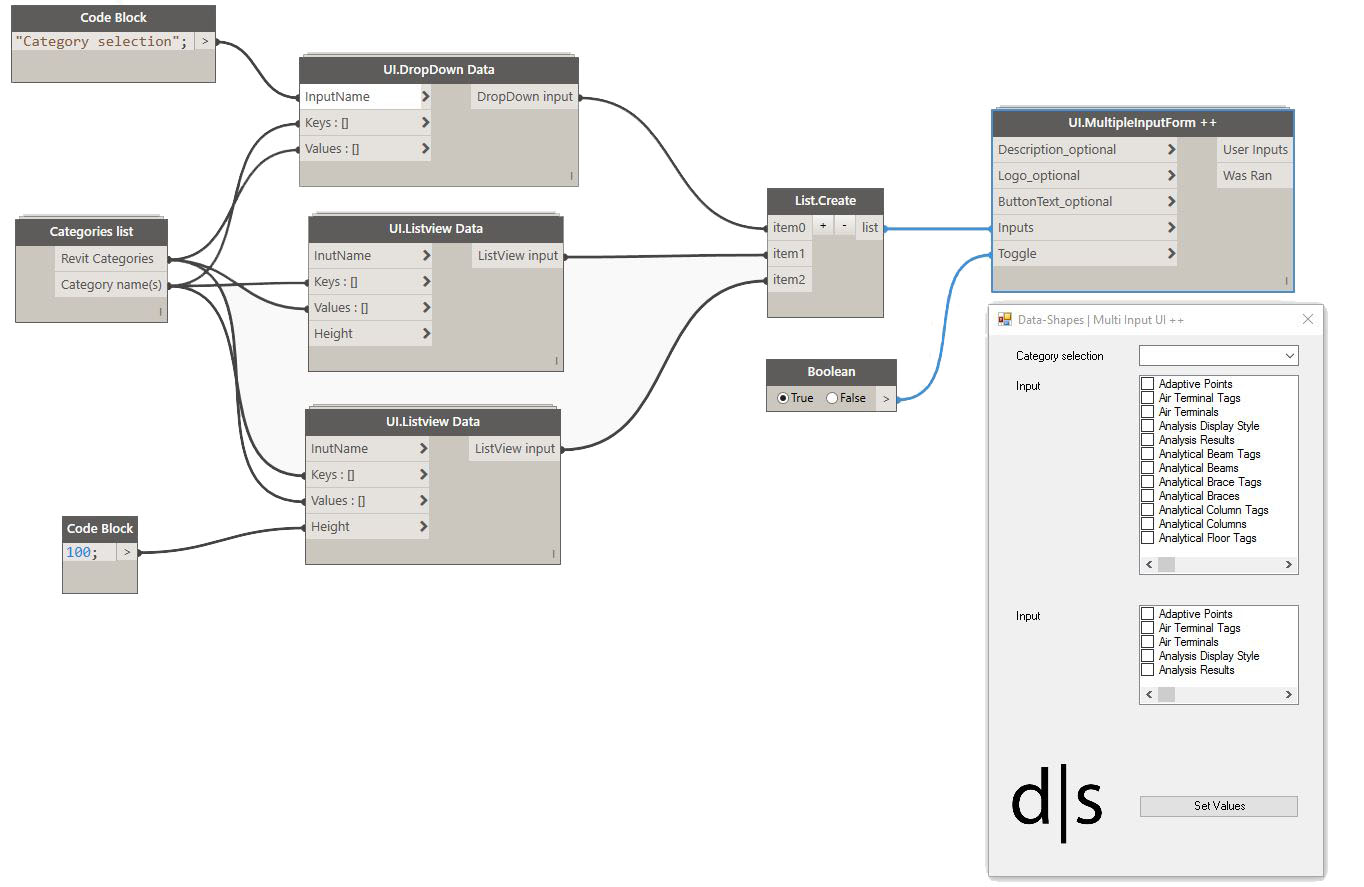
- DropDown and ListView inputs: These are created with “UI.DropDown Data” and “UI.ListView Data” nodes. The “Keys” are the elements that will be shown to the user, and the “Values” are the elements that will be returned accordingly to the keys. The keys must be strings ! The UI.ListView Data node allows you to set the height of the list window (notice the difference of list windows height in the following image):
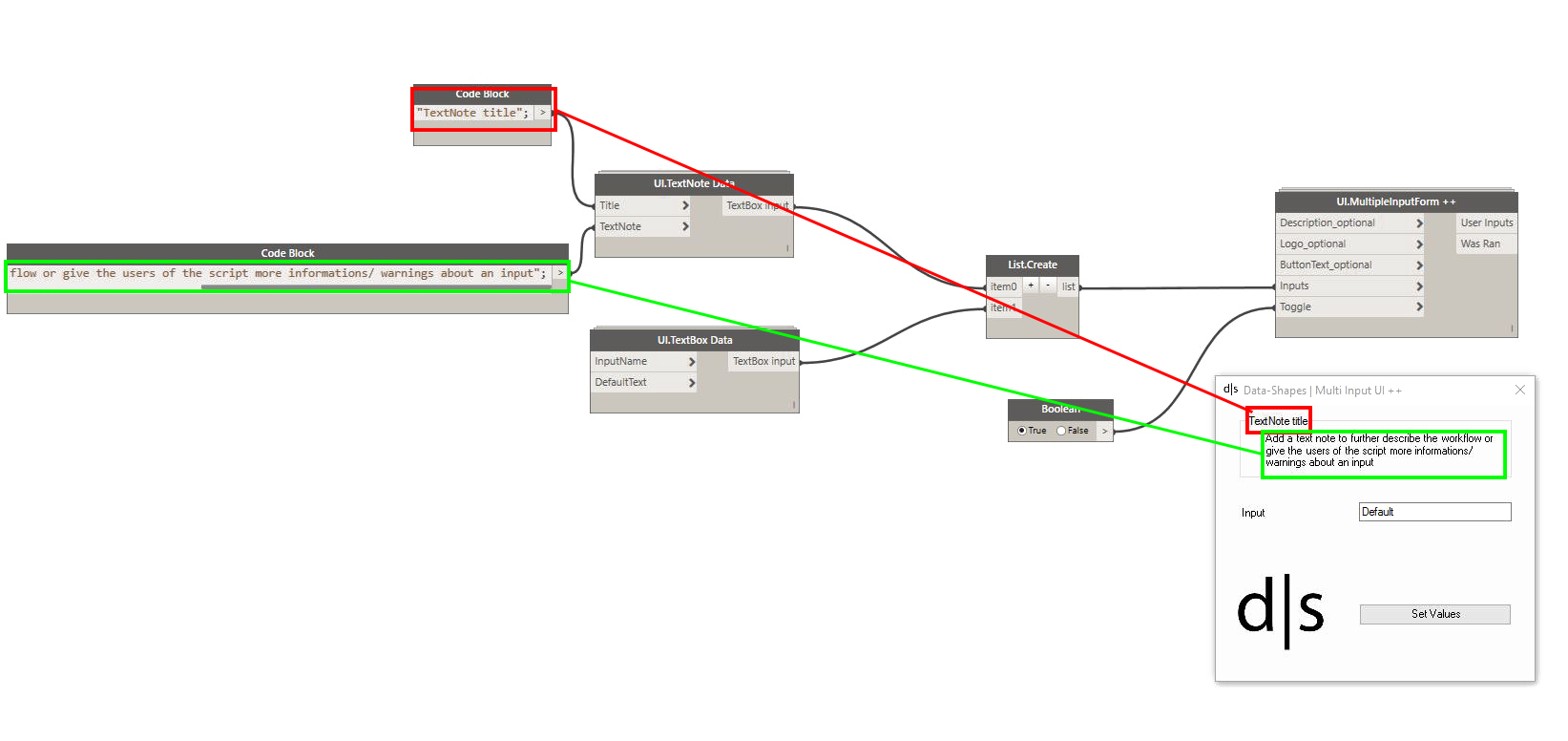
- TextNote : This input has been inspired by Micah (@kraftwerk15). It allows to add a textual note to the form. You can also add a title for the note (optional):
I hope this will further help people adopt dynamo workflows in your workplaces !
Here’s the code of this node:
This file contains hidden or bidirectional Unicode text that may be interpreted or compiled differently than what appears below. To review, open the file in an editor that reveals hidden Unicode characters.
Learn more about bidirectional Unicode characters
| #Copyright (c) mostafa el ayoubi , 2016 | |
| #Data-Shapes http://www.data-shapes.net , elayoubi.mostafa@gmail.com | |
| import clr | |
| try: | |
| clr.AddReference('System.Windows.Forms') | |
| clr.AddReference('System.Drawing') | |
| from System.Drawing import Point , Size , Graphics, Bitmap, Image, Font, FontStyle, Icon, Color | |
| from System.Windows.Forms import Application, Button, Form, Label, ColumnHeader, TextBox, CheckBox, FolderBrowserDialog, OpenFileDialog, DialogResult, ComboBox, FormBorderStyle, ListView, ListViewItem , SortOrder, Panel, ImageLayout, GroupBox | |
| from System.Collections.Generic import * | |
| from System.Windows.Forms import View as vi | |
| clr.AddReference('System') | |
| from System import IntPtr | |
| import sys | |
| pyt_path = r'C:\Program Files (x86)\IronPython 2.7\Lib' | |
| sys.path.append(pyt_path) | |
| import os | |
| clr.AddReference('RevitAPIUI') | |
| from Autodesk.Revit.UI import Selection | |
| importcolorselection = 0 | |
| try: | |
| from Autodesk.Revit.UI import ColorSelectionDialog | |
| except: | |
| importcolorselection = 1 | |
| clr.AddReference('RevitNodes') | |
| import Revit | |
| clr.ImportExtensions(Revit.Elements) | |
| clr.ImportExtensions(Revit.GeometryConversion) | |
| clr.AddReference('RevitServices') | |
| from RevitServices.Persistence import DocumentManager | |
| doc = DocumentManager.Instance.CurrentDBDocument | |
| uidoc = DocumentManager.Instance.CurrentUIApplication.ActiveUIDocument | |
| #getting screen resolution and creating resolution factor to handle high res screens | |
| import ctypes | |
| user32 = ctypes.windll.user32 | |
| resolutionX = user32.GetSystemMetrics(0) | |
| resolutionY = user32.GetSystemMetrics(1) | |
| resfactX = resolutionX/1920 | |
| resfactY = resolutionY/1080 | |
| class MultiTextBoxForm(Form): | |
| def __init__(self): | |
| self.Text = 'Data-Shapes | Multi Input UI ++' | |
| self.output = [] | |
| self.values = [] | |
| def setclose(self, sender, event): | |
| cbindexread = 0 | |
| for f in self.output: | |
| if f.GetType() == TextBox: | |
| self.values.append(f.Text) | |
| if f.GetType() == CheckBox: | |
| self.values.append(f.Checked) | |
| if f.GetType() == Button: | |
| if f.Tag == None : | |
| self.values.append(f.Text) | |
| else: | |
| self.values.append(f.Tag) | |
| if f.GetType() == ComboBox: | |
| key = f.Text | |
| self.values.append(f.Tag[key]) | |
| if f.GetType() == mylistview: | |
| self.values.append([f.Values[i.Text] for i in f.CheckedItems]) | |
| self.Close() | |
| def reset(self, sender, event): | |
| pass | |
| def openfile(self, sender, event): | |
| ofd = OpenFileDialog() | |
| dr = ofd.ShowDialog() | |
| if dr == DialogResult.OK: | |
| sender.Text = ofd.FileName | |
| def opendirectory(self, sender, event): | |
| fbd = FolderBrowserDialog() | |
| dr = fbd.ShowDialog() | |
| if dr == DialogResult.OK: | |
| sender.Text = fbd.SelectedPath | |
| def pickobjects(self, sender, event): | |
| sel = uidoc.Selection.PickObjects(Selection.ObjectType.Element,'') | |
| selelem = [doc.GetElement(s.ElementId) for s in sel] | |
| sender.Tag = (selelem) | |
| def pickfaces(self, sender, event): | |
| selface = uidoc.Selection.PickObjects(Selection.ObjectType.Face,'') | |
| faces = [uidoc.Document.GetElement(s).GetGeometryObjectFromReference(s).ToProtoType(True) for s in selface] | |
| sender.Tag = [i for f in faces for i in f] | |
| def pickedges(self, sender, event): | |
| seledge = uidoc.Selection.PickObjects(Selection.ObjectType.Edge,'') | |
| edges = [uidoc.Document.GetElement(s).GetGeometryObjectFromReference(s).AsCurve().ToProtoType(True) for s in seledge] | |
| sender.Tag = edges | |
| def colorpicker(self, sender, event): | |
| dialog = ColorSelectionDialog() | |
| selection = ColorSelectionDialog.Show(dialog) | |
| selected = dialog.SelectedColor | |
| sender.Tag = selected | |
| sender.BackColor = Color.FromArgb(selected.Red,selected.Green,selected.Blue) | |
| sender.ForeColor = Color.FromArgb(selected.Red,selected.Green,selected.Blue) | |
| def topmost(self): | |
| self.TopMost = True | |
| def lvadd(self, sender, event): | |
| sender.Tag = [i for i in sender.CheckedItems] | |
| class mylistview(ListView): | |
| def __init__(self): | |
| self.Values = [] | |
| #Form initialization | |
| form = MultiTextBoxForm() | |
| form.topmost() | |
| xlabel = 25*resfactX | |
| xinput = 150*resfactX | |
| y = 10*resfactY | |
| inputheight = 20*resfactY | |
| inputwidth = 160*resfactX | |
| fields = [] | |
| error = 0 | |
| #Description | |
| if IN[3] != "": | |
| des = Label() | |
| des.Font = Font("Arial", 15,FontStyle.Bold) | |
| des.Location = Point(xlabel,y) | |
| des.AutoSize = True | |
| des.MaximumSize = Size(300*resfactX,0) | |
| des.Text = IN[3] | |
| form.Controls.Add(des) | |
| y = des.Bottom + 40*resfactY | |
| #Input form | |
| if isinstance(IN[0],list): | |
| inputtypes = IN[0] | |
| else: | |
| inputtypes = [IN[0]] | |
| for j in inputtypes: | |
| label = Label() | |
| label.Location = Point(xlabel,y+4) | |
| label.AutoSize = True | |
| label.MaximumSize = Size(120*resfactX,0) | |
| label.Text = j.inputname | |
| form.Controls.Add(label) | |
| if j.__class__.__name__ == 'dropdown': | |
| cb = ComboBox() | |
| cb.Location = Point(xinput,y) | |
| cb.Width = inputwidth | |
| cb.Height = inputheight | |
| [cb.Items.Add(i) for i in j.keys() if not (i == 'inputname' or i == 'height')] | |
| cb.Tag = j | |
| form.Controls.Add(cb) | |
| form.output.append(cb) | |
| y = label.Bottom + 25*resfactY | |
| elif j.__class__.__name__ == 'listview': | |
| lv = mylistview() | |
| lv.Values = j | |
| lv.CheckBoxes = True | |
| lv.View = vi.List | |
| lv.Sorting = SortOrder.Ascending | |
| [lv.Items.Add(i) for i in j.keys() if not (i == 'inputname' or i == 'height')] | |
| lv.Location = Point(xinput,y) | |
| lv.Width = inputwidth | |
| lv.Height = j.height | |
| lv.Scrollable = True | |
| form.Controls.Add(lv) | |
| form.output.append(lv) | |
| y = lv.Bottom + 25*resfactY | |
| elif j.__class__.__name__ == 'uitext': | |
| tb = TextBox() | |
| tb.Text = j.defaultvalue | |
| tb.Width = inputwidth | |
| tb.Height = inputheight | |
| tb.Location = Point(xinput,y) | |
| form.Controls.Add(tb) | |
| form.Controls.Add(label) | |
| form.output.append(tb) | |
| y = label.Bottom + 25*resfactY | |
| elif j.__class__.__name__ == 'uitextnote': | |
| gb = GroupBox() | |
| gb.Text = j.title | |
| gb.Parent = form | |
| gb.SendToBack() | |
| gb.BackColor = Color.Transparent | |
| gb.Location = Point(xlabel, y) | |
| tn = Label() | |
| tn.Location = Point(xlabel*resfactX,18*resfactY) | |
| tn.AutoSize = True | |
| tn.MaximumSize = Size(260*resfactX,0) | |
| tn.Text = j.textnote | |
| tn.BringToFront() | |
| gb.Controls.Add(tn) | |
| gb.Size = Size(285*resfactX, tn.Bottom-tn.Top+25*resfactY) | |
| y = gb.Bottom + 25*resfactY | |
| elif j.__class__.__name__ == 'uibool': | |
| yn = CheckBox() | |
| yn.Width = inputwidth | |
| yn.Height = inputheight | |
| yn.Location = Point(xinput,y) | |
| yn.Text = j.booltext | |
| yn.Checked = j.defaultvalue | |
| form.Controls.Add(yn) | |
| form.output.append(yn) | |
| y = label.Bottom + 25*resfactY | |
| elif j.__class__.__name__ == 'uifilepath': | |
| fp = Button() | |
| fp.Width = inputwidth | |
| fp.Height = inputheight | |
| fp.Text = j.defaultvalue | |
| fp.Location = Point(xinput,y) | |
| form.Controls.Add(fp) | |
| fp.Click += form.openfile | |
| form.output.append(fp) | |
| y = label.Bottom + 25*resfactY | |
| elif j.__class__.__name__ == 'uidirectorypath': | |
| dp = Button() | |
| dp.Width = inputwidth | |
| dp.Height = inputheight | |
| dp.Text = j.defaultvalue | |
| dp.Location = Point(xinput,y) | |
| form.Controls.Add(dp) | |
| dp.Click += form.opendirectory | |
| form.output.append(dp) | |
| y = label.Bottom + 30*resfactY | |
| elif j.__class__.__name__ == 'uiselectelements': | |
| se = Button() | |
| se.Width = inputwidth | |
| se.Heigth = inputheight | |
| se.Text = j.buttontext | |
| se.Location = Point(xinput,y) | |
| form.Controls.Add(se) | |
| se.Click += form.pickobjects | |
| form.output.append(se) | |
| y = label.Bottom + 25*resfactY | |
| elif j.__class__.__name__ == 'uiselectfaces': | |
| sf = Button() | |
| sf.Width = inputwidth | |
| sf.Height = inputheight | |
| sf.Text = j.buttontext | |
| sf.Location = Point(xinput,y) | |
| form.Controls.Add(sf) | |
| sf.Click += form.pickfaces | |
| form.output.append(sf) | |
| y = label.Bottom + 25*resfactY | |
| elif j.__class__.__name__ == 'uiselectedges': | |
| sed = Button() | |
| sed.Width = inputwidth | |
| sed.Height = inputheight | |
| sed.Text = j.buttontext | |
| sed.Location = Point(xinput,y) | |
| form.Controls.Add(sed) | |
| sed.Click += form.pickedges | |
| form.output.append(sed) | |
| y = label.Bottom + 25*resfactY | |
| elif j.__class__.__name__ == 'uicolorpick' and importcolorselection == 0: | |
| cp = Button() | |
| cp.Width = inputwidth | |
| cp.Height = inputheight | |
| cp.Text = j.buttontext | |
| cp.Location = Point(xinput,y) | |
| form.Controls.Add(cp) | |
| cp.Click += form.colorpicker | |
| form.output.append(cp) | |
| y = label.Bottom + 25*resfactY | |
| elif j.__class__.__name__ == 'uicolorpick' and importcolorselection == 1: | |
| importcolorselection = 2 | |
| #Adding validation button | |
| button = Button() | |
| button.Text = IN[1] | |
| button.Width = inputwidth | |
| button.Location = Point (150*resfactX,y+60*resfactY) | |
| button.Click += form.setclose | |
| form.Controls.Add(button) | |
| form.MaximizeBox = False | |
| form.MinimizeBox = False | |
| form.FormBorderStyle = FormBorderStyle.FixedSingle | |
| #Adding Logo | |
| #default logo in case no input | |
| try: | |
| #There won't be a default logo if your package folder is not the default one | |
| deflogopath = os.getenv('APPDATA')+"\\Dynamo\Dynamo Revit\\1.2\packages\Data-Shapes\extra\\a.png" | |
| if IN[4] == '': | |
| ima = Image.FromFile(deflogopath) | |
| else : | |
| ima = IN[4] | |
| logo = Panel() | |
| logo.Size = Size(100*resfactX,100*resfactX) | |
| ratio = (ima.Height)/(ima.Width) | |
| h = float(ima.Height) | |
| w = float(ima.Width) | |
| ratio = h/w | |
| scaledimage = Bitmap(100*resfactX,(100*ratio)*resfactY) | |
| gr = Graphics.FromImage(scaledimage) | |
| gr.DrawImage(ima,0,0,100*resfactX,100*ratio*resfactY) | |
| logo.BackgroundImage = scaledimage | |
| logo.BackgroundImageLayout = ImageLayout.Center | |
| form.Controls.Add(logo) | |
| logo.Location = Point(20*resfactX,y+20*resfactY) | |
| #Setting icon | |
| if IN[4] == '': | |
| bmp = Bitmap.FromFile(deflogopath) | |
| else: | |
| bmp = Bitmap(IN[4]) | |
| thumb = bmp.GetThumbnailImage(64*resfactX, 64*resfactX, bmp.GetThumbnailImageAbort,IntPtr.Zero) | |
| thumb.MakeTransparent(); | |
| icon = Icon.FromHandle(thumb.GetHicon()) | |
| form.Icon = icon | |
| except: | |
| form.ShowIcon = False | |
| form.Height = y + 180*resfactY | |
| form.Width = 350*resfactX | |
| if IN[2]: | |
| if importcolorselection != 2: | |
| Application.Run(form) | |
| result = form.values | |
| OUT = result,True | |
| else: | |
| OUT = ['ColorSelection input is only available With Revit 2017'] , False | |
| else : | |
| OUT = ['Set toggle to true!'] , False | |
| except: | |
| import traceback | |
| OUT = traceback.format_exc() , "error" |



 data|shapes
Leave a reply to 3Pinter Cancel reply