Multi User Input Form with Dynamo

Written by:

One of the main issues when trying to implement Dynamo into your office workflows is the user interface. Don’t get me wrong, I love it. But not everybody does.

So, I have been seeking ways to create a user interface that would be more conventional, in order to make it easier for a larger number of people to benefit from the power of Dynamo. The recent implementation of Dynamo Player in Revit 2017.1 brought us closer to achieving this, but the user input options are still lean.

These past couple of months, I spent a lot of time getting familiar with the revit API. Unfortunately, the only dialog box it offers is the TaskDialog, which doesn’t allow much. Recently, I saw a post on twitter that showed how winforms could be created via IronPython, I found this pretty exciting. And with John Pierson’s latest addition to his Rhythms package I was convinced that it was possible, and not so complicated.

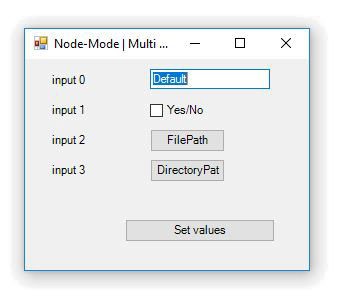
After reading about winforms, I decided to make a node that would allow the user to create multiple input dialog boxes. So far, it handles :

  • Strings (which can be converted to numbers)
  • Booleans
  • FilePaths
  • DirectoryPaths

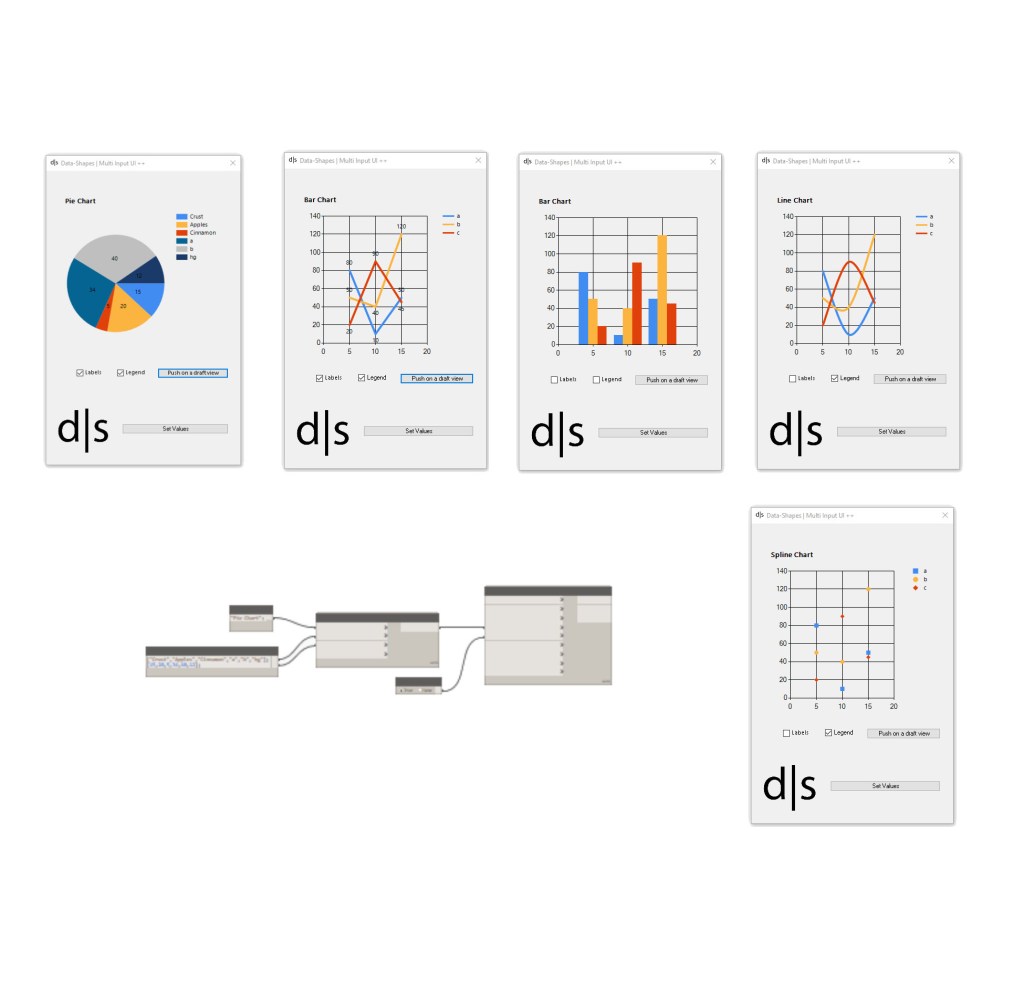
Edit: there has been an update with more input types! See more here .  

Here is how it works :

newnode
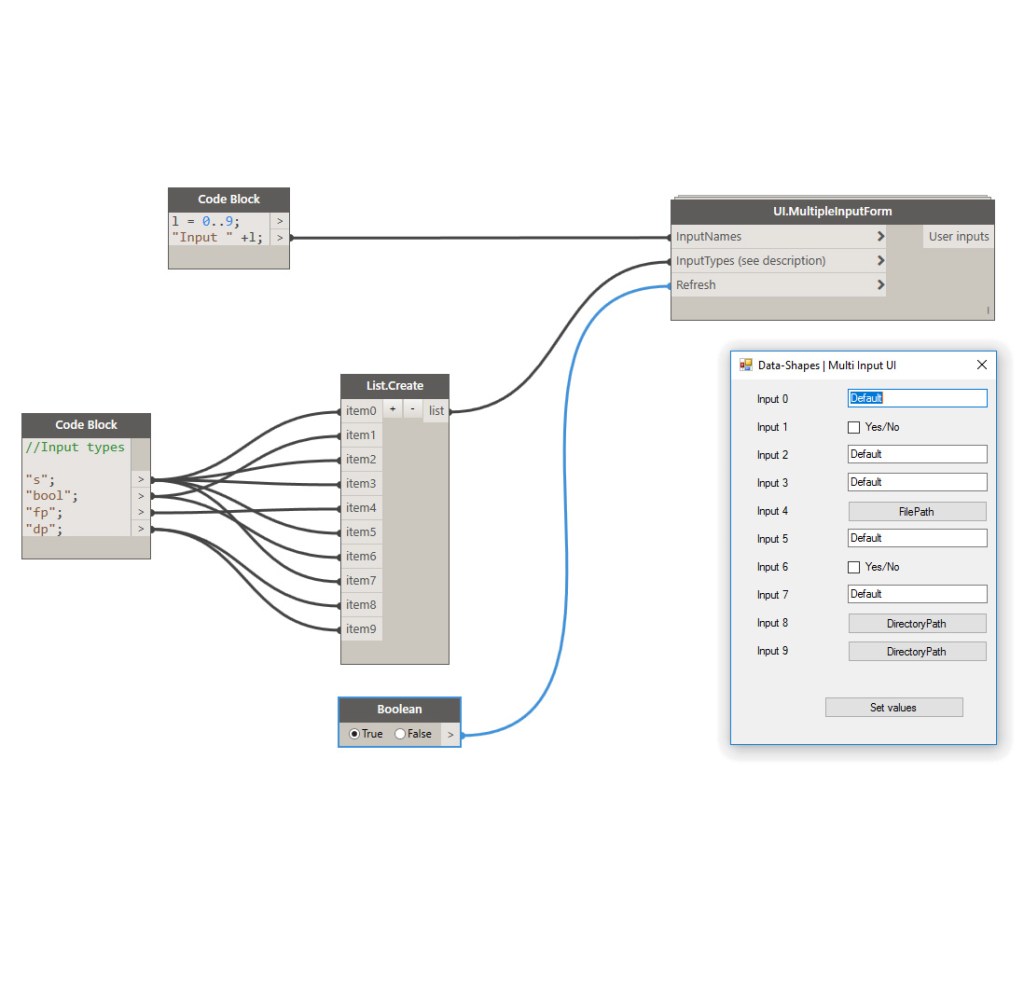
UI.MultipleInputForm, Data-Shapes package

The node takes three inputs :

  1. A list of input names
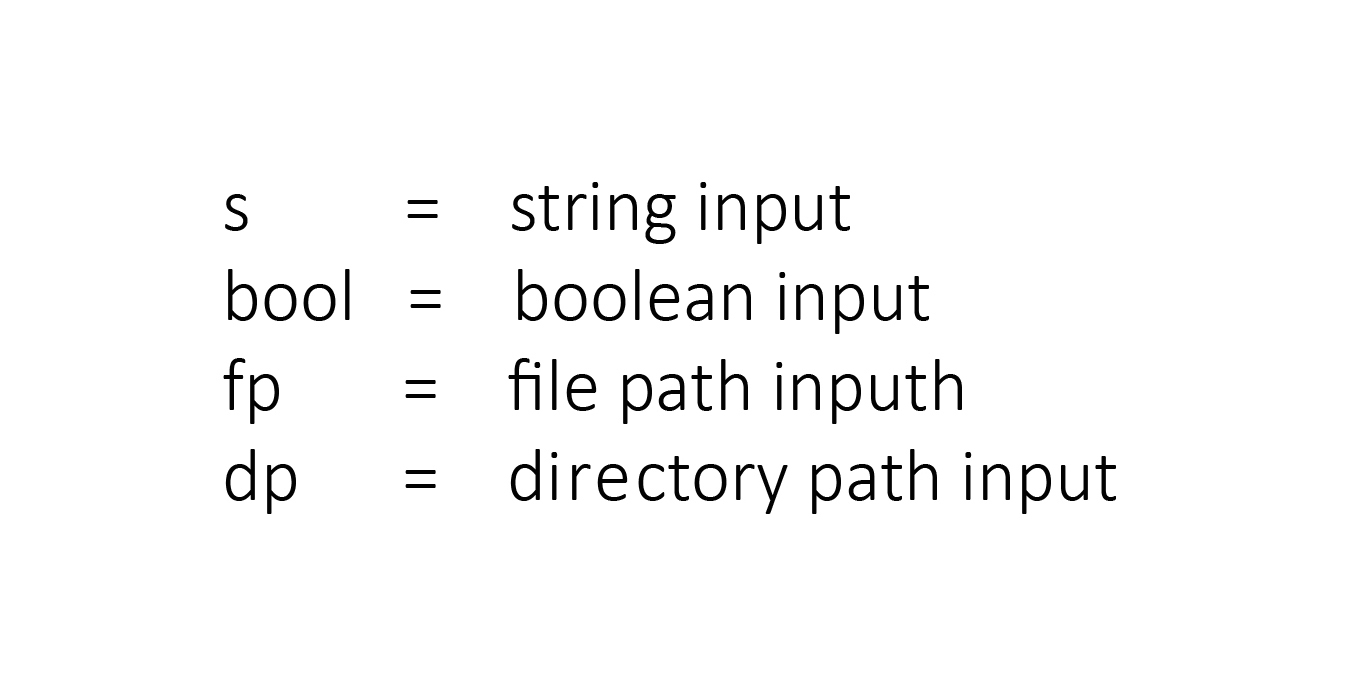
  2. A list of input types (see codification below)
  3. A boolean toggle to refresh

The list of input types consists of a list of strings that will define the kind of input shown in the form.
codification
Input Type codification

I aim to replace this by a drop down list node with the input types. It’s going to take zero touch nodes, which I’m not yet very familiar with.

2
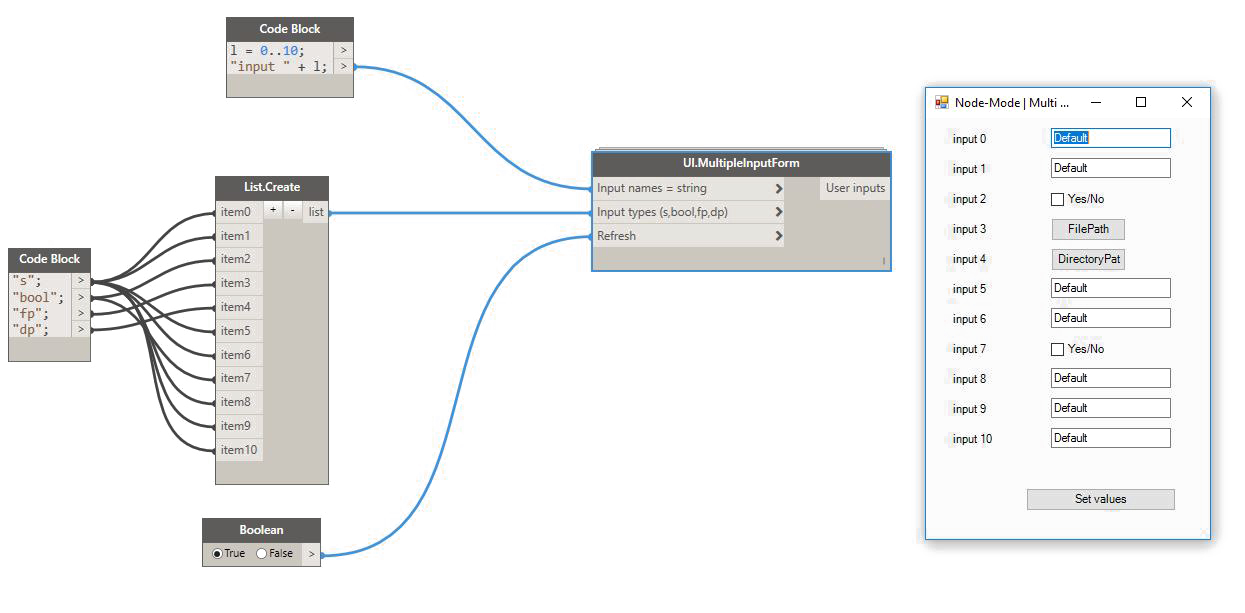
Example of multi-user input form creation
form
The created form

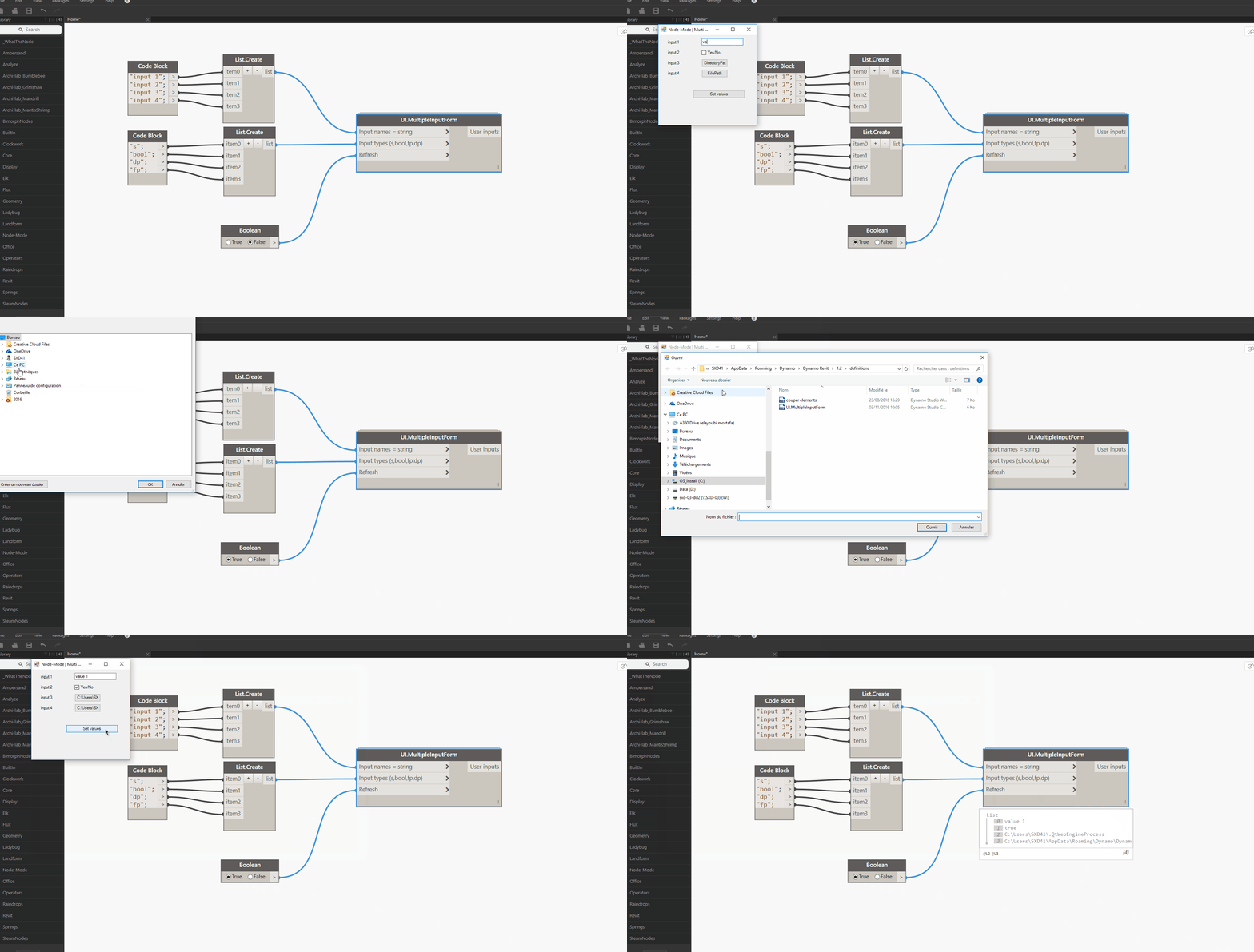
UI.MultiInputForm (Data-Shapes package , code at the end of the article) will return the values input by the user in a list:
animation

You can add as many inputs as you want!

3
Unique input form
4
Multiple input form

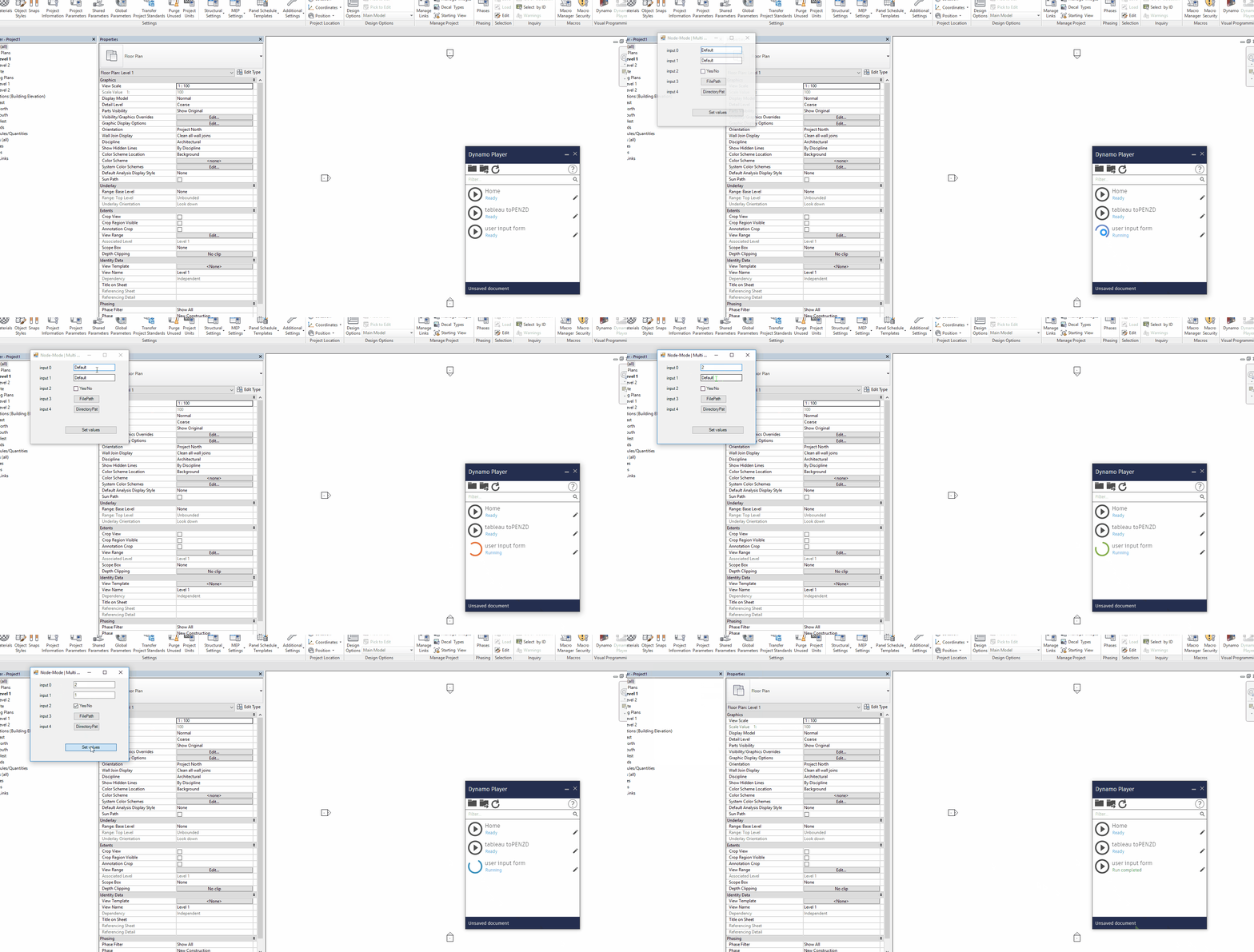
It all – of course – gets much better when DynamoPlayer is involved:
player

I hope this node is useful in getting more people to accept using dynamo. It’s just trying to fill the gap until the Dev Team or another user comes up with something much better.

Feel free to comment if you have any suggestion for improvement!

Here’s the code:


#Copyright (c) mostafa el ayoubi , 2016
#Data-Shapes http://www.data-shapes.net , elayoubi.mostafa@gmail.com
import clr
clr.AddReference('System.Windows.Forms')
clr.AddReference('System.Drawing')
from System.Drawing import Point
from System.Windows.Forms import Application, Button, Form, Label, TextBox, CheckBox, FolderBrowserDialog, OpenFileDialog, DialogResult
class MultiTextBoxForm(Form):
def __init__(self):
self.Text = 'Data-Shapes | Multi Input UI'
self.output = []
self.values = []
def setclose(self, sender, event):
for f in self.output:
if f.GetType() == TextBox:
self.values.append(f.Text)
if f.GetType() == CheckBox:
self.values.append(f.Checked)
if f.GetType() == Button:
self.values.append(f.Text)
self.Close()
def reset(self, sender, event):
pass
def openfile(self, sender, event):
ofd = OpenFileDialog()
dr = ofd.ShowDialog()
if dr == DialogResult.OK:
sender.Text = ofd.FileName
def opendirectory(self, sender, event):
fbd = FolderBrowserDialog()
dr = fbd.ShowDialog()
if dr == DialogResult.OK:
sender.Text = fbd.SelectedPath
form = MultiTextBoxForm()
xlabel = 25
xinput = 125
y = 10
fields = []
error = 0
#Input form
if isinstance(IN[0],list):
inputnames = IN[0]
else:
inputnames = [IN[0]]
if isinstance(IN[1],list):
inputtypes = IN[1]
else:
inputtypes = [IN[1]]
for i,j in zip(inputnames,inputtypes):
label = Label()
label.Location = Point(xlabel,y+4)
label.Height = 20
label.Width = 80
label.Text = str(i)
form.Controls.Add(label)
if j == 's':
tb = TextBox()
tb.Text = 'Default'
tb.Width = 120
tb.Location = Point(xinput,y)
y += 30
form.Controls.Add(tb)
form.Controls.Add(label)
form.output.append(tb)
elif j == 'bool':
yn = CheckBox()
yn.Location = Point(xinput,y)
yn.Text = 'Yes/No'
form.Controls.Add(yn)
y += 30
form.output.append(yn)
elif j == 'fp':
fp = Button()
fp.Width = 100
fp.Text = 'FilePath'
fp.Location = Point(xinput,y)
y+= 30
form.Controls.Add(fp)
fp.Click += form.openfile
form.output.append(fp)
elif j == 'dp':
dp = Button()
dp.Width = 100
dp.Text = 'DirectoryPath'
dp.Location = Point(xinput,y)
y+= 30
form.Controls.Add(dp)
dp.Click += form.opendirectory
form.output.append(dp)
else :
error = 1
button = Button()
button.Text = 'Set values'
button.Width = 150
button.Location = Point (100,y+30)
button.Click += form.setclose
form.Controls.Add(button)
form.Height = y + 120
if error == 0:
Application.Run(form)
result = form.values
else :
result = 'one or more input types are incorrect'
OUT = result

29 responses to “Multi User Input Form with Dynamo”

  1. Using A Custom Input Form In Dynamo | BIM Bytes

    […] viahttps://data-shapes.net/2016/11/03/multi-user-input-form-with-dynamo/ […]

    Like

  2. Using A Custom Input Form In Dynamo – Revit news

    […] viahttps://data-shapes.net/2016/11/03/multi-user-input-form-with-dynamo/ […]

    Like

  3. jmmkm Avatar
    jmmkm

    excellent mostafa

    Liked by 1 person

  4. C Lindhe Avatar
    C Lindhe

    Brilliant 🙂

    Liked by 1 person

  5. Swapnil Avatar
    Swapnil

    Hi Mostafa,

    I am searching/Trying to create this node from last 6 month.
    You resolve all my problems, Great work.

    Liked by 1 person

  6. Duy Vu Avatar
    Duy Vu

    excellent, but if there are other ways to input like selecting , it’ll be more perfect.
    Thanks!\

    Liked by 1 person

    1. data|shapes Avatar
      data|shapes

      Hi DUY VU ,
      thanks for your comment. There has actually been an update. Check out this post:
      https://data-shapes.net/2016/11/12/update-multiple-input-form-with-dynamo/

      you can select elements, faces, edges, and use drop down lists. It’s all in version 2016.11.15 of the package.

      Like

      1. Duy Vu Avatar
        Duy Vu

        Wonderful, it’s extremely useful. Thank you.

        Liked by 1 person

  7. Brent Conner Avatar
    Brent Conner

    Is there a way to adjust the size of the dialog box for Hi-Res Monitors.

    Liked by 1 person

    1. data|shapes Avatar
      data|shapes

      Hi Brent,
      I knew this comment would pop at some point 🙂 I already have something in the works for high resultion screen handling. I will publish soon and let you know!

      Like

    2. data|shapes Avatar
      data|shapes

      Please upgrade the package to the latest version (2017.02.01), all screen resolutions are now handled.

      Like

      1. Alex Gilbert Avatar
        Alex Gilbert

        Hi Mostafa,

        Your package is a pearl, but since I upgraded to 2017.02.01, only the title bar of the dialogue box appears, allowing no other action than closing it. Default values are still selected on run.
        I’ve since downgraded to 2017.2.0 and it works like it used to again.

        Like

  8. Brent Conner Avatar
    Brent Conner

    Hi Mostafa

    I have downloaded the latest version 2017.02.01 however I still have the same issue of the dialog box being truncated on My Hi Res Monitors, I am running one Monitor at 3000 x 2000 with 200% scaling and the other Monitor is running at 3440 x 1440 at 100%

    Like

  9. Brent Conner Avatar
    Brent Conner

    Hi Mostafa

    I have downloaded the latest version 2017.02.01 however I still have the same issue of the dialog box being truncated on My Hi Res Monitors, I am running one Monitor at 3000 x 2000 with 200% scaling and the other Monitor is running at 3440 x 1440 at 100%

    My main monitor is the 3000 x 2000 200% scaling, If I set the monitor anywhere greater than 150% scaling the dialog box is truncated.

    Like

  10. Jeff Avatar
    Jeff

    Hi,
    awsome package, thank you 🙂

    Do you see any way how i could connect the Springs.SelectLinkedElement node to this?

    Actually i am trying to create a *dyn with your UI. Nodes to select a linked Document, an element from that document and then automate the insertion of my own family at the exact same point with the same dimensions. ( the good old Openings workflow with Arch., Struct, and MEP Model)
    I’ll post to dynamobim,org and add the link here.
    thanx
    Jeff

    Liked by 1 person

    1. data|shapes Avatar
      data|shapes

      Hi Jeff,
      thanks for your comment.
      Yes this can be done. I’ll let you know when it’s available.

      Like

  11. Ronald Avatar
    Ronald

    is it possible to create a second list with mutiple inputs that’s linked to the first list.

    Example: first list contains a count from 1 to 10, let say that 2 is selected.
    the second list contains 4 inputs. I want, depening on the count, to make the same 4 choices for every count.

    Liked by 1 person

    1. data|shapes Avatar
      data|shapes

      Hi Ronald,
      you can achieve that using a sequence of UI.MultipleInputForm++ nodes. The outputs of the first node can be used to alter the inputs of the second form. In order for the sequence to always be run in the same order, you need to use the “was run” output of the first node as a toggle for the second one.

      Like

      1. Ronald Avatar
        Ronald

        i was able to link the first form to the next but i can only fill the second form once en not 4 times as i selected in the first form. Whats missing?

        Like

    2. data|shapes Avatar
      data|shapes
      1. Ronald Avatar
        Ronald

        Yes, that’s it. Only i am using drop down data.
        Where can i find the custom node?

        Like

    3. data|shapes Avatar
      data|shapes

      No custom node here (except for the data-shapes ones of course:) ). I’m just using List.OfRepeatedItem to multiply the UI input node. It’ll work exactly the same with a dorpdown.

      Like

  12. MIke Bonson Avatar
    MIke Bonson

    Wonderful nodes you’ve created. I use them all the time.

    Can I control where on the screen the interface pops up? It seems to end up on the lower left.

    Thanks for your help and all your hard work.

    Mike in Charleston

    Like

  13. Mike Bronson Avatar
    Mike Bronson

    Using your UI.ListViewData – can I change the distance between the lines? I’m trying to compress the gui down. With all my choices, it’s approaching the height of my screen.

    thanks for your help,
    mike

    Like

    1. data|shapes Avatar
      data|shapes

      Hey Mike, by setting a maximum height for the form (it is an input of the UI.MultipleInputForm ++ Node) you’ll be able to make the form scrollable and make sure it doesn’t get too big for your screen.

      Like

  14. Ben Robinson Avatar
    Ben Robinson

    Hi Mostafa,

    We are looking to create a interface for multiple drop down box for a list of unknown length (will change every time). with the additional functionality of people able to control the width height etc of the UI (like you can with the Multiinputform++)

    At the moment from what i can tell the only way to get multiple drop down without knowing the number of drop downs required. Is to use the UI. Multipleinput form node. which does not have the width height functionality.

    Am i correct in my above thinking and if so, are you planning to add these functions to the node?

    Many thanks

    Ben

    Liked by 1 person

    1. data|shapes Avatar
      data|shapes

      Hi Ben,
      Thanks for your message.
      actually UI.MultiInputForm++ will allow you to do that easilly. You can use the lacing on UI.DropDown data to create many dropdown inputs from a list . Let me know if you need an example.

      Like

  15. Fatima Avatar
    Fatima

    hi Mostapha,

    Thank you for this interesting node.
    However, I have a problem. I can not run the program.
    It makes : execution started but it ends up getting stuck.

    Normally the result of the node (OUT) is the list that I did enter on the GUI if understand.

    In your opinion where is the problem knowing that the entries are two drop-down list of 137 items.

    Thank you in advance.
    Best regards,

    Like

    1. Vladimir Avatar
      Vladimir

      Dear Team,
      thanks for very useful tools!
      Could you look at my post on Dynamo forum?
      https://forum.dynamobim.com/t/data-shapes-multi-input-ui-get-list-of-lists/29186
      Thanks in advance!

      Like

Leave a reply to Ronald Cancel reply

This site uses Akismet to reduce spam. Learn how your comment data is processed.

Latest Articles