
Getting All Site Geometry Inside Dynamo With DynaMaps

Written by:

Hey everyone! You may have heard already about DynaMaps. It’s been out for about a month now. Reception has been overwhelmingly positive, thanks to all those who gave it a shot and sent their valuable feedback. A presentation was published on the Dynamo Blog for the first release, but it’s evolving so fast it seems usefull to present some of the possible workflows. So here we go!

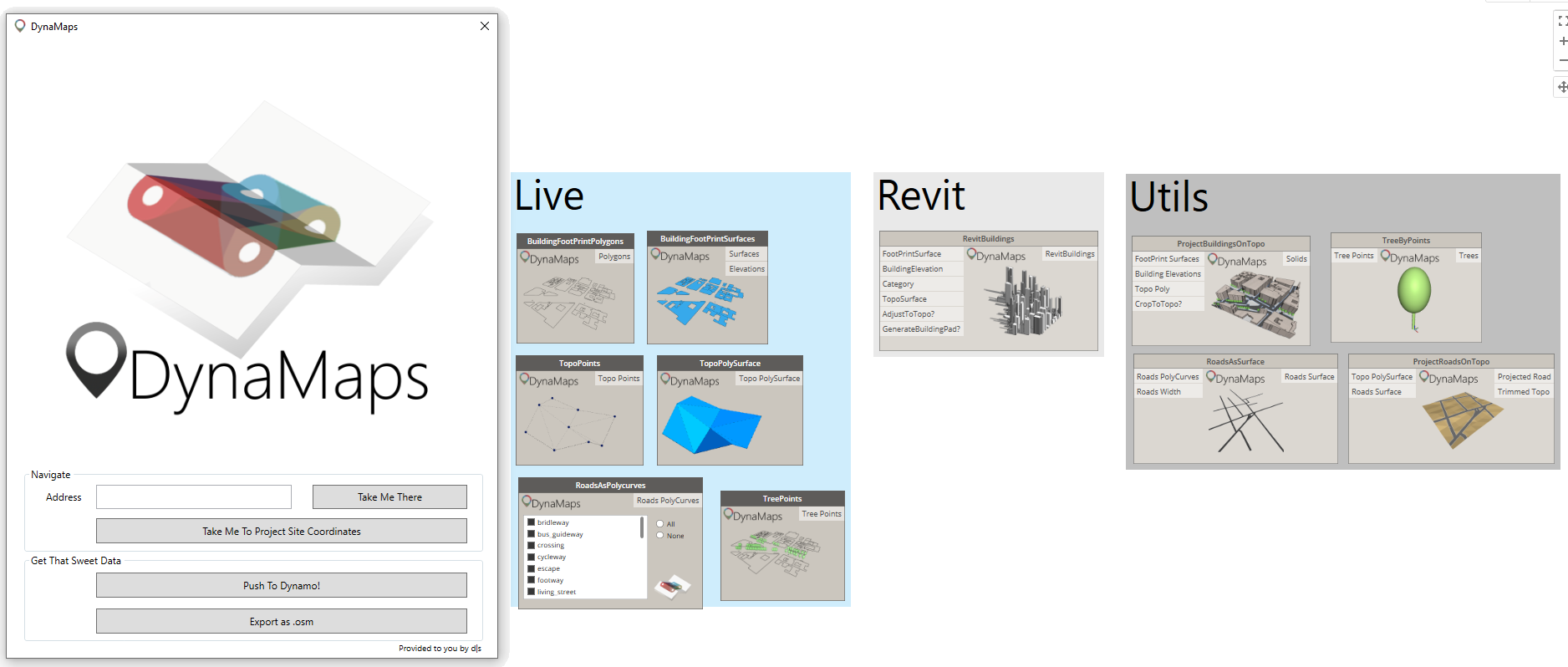
As explained in the Dynamo Blog Post, DynaMaps is a package containing a ViewExtension as well as a set of nodes :
DynaMapckage

The nodes were made to import site geometry inside Dynamo in the most straightforward way. They are sorted in three categories:

  • Live : Nodes that harness data from the selected area in the DynaMaps View Extension. They are the link between the view extension and the rest of your graph.
  • Revit : Nodes that use DynaMaps Data to create Revit Geometry in a very straightforward way. So far there is only RevitBuildings but more are on their way!
  • Utils : Those are made to ease some common operations on geometry. They all work from the DynaMaps Live nodes data.

Here’s a step by step demonstrations on  how to get all site geometry inside dynamo. In a future blogpost, we’ll document a workflow to create Revit site geometry using DynaMaps.

GETTING ALL SITE GEOMETRY INSIDE DYNAMO

Step 1 : Selecting your site area

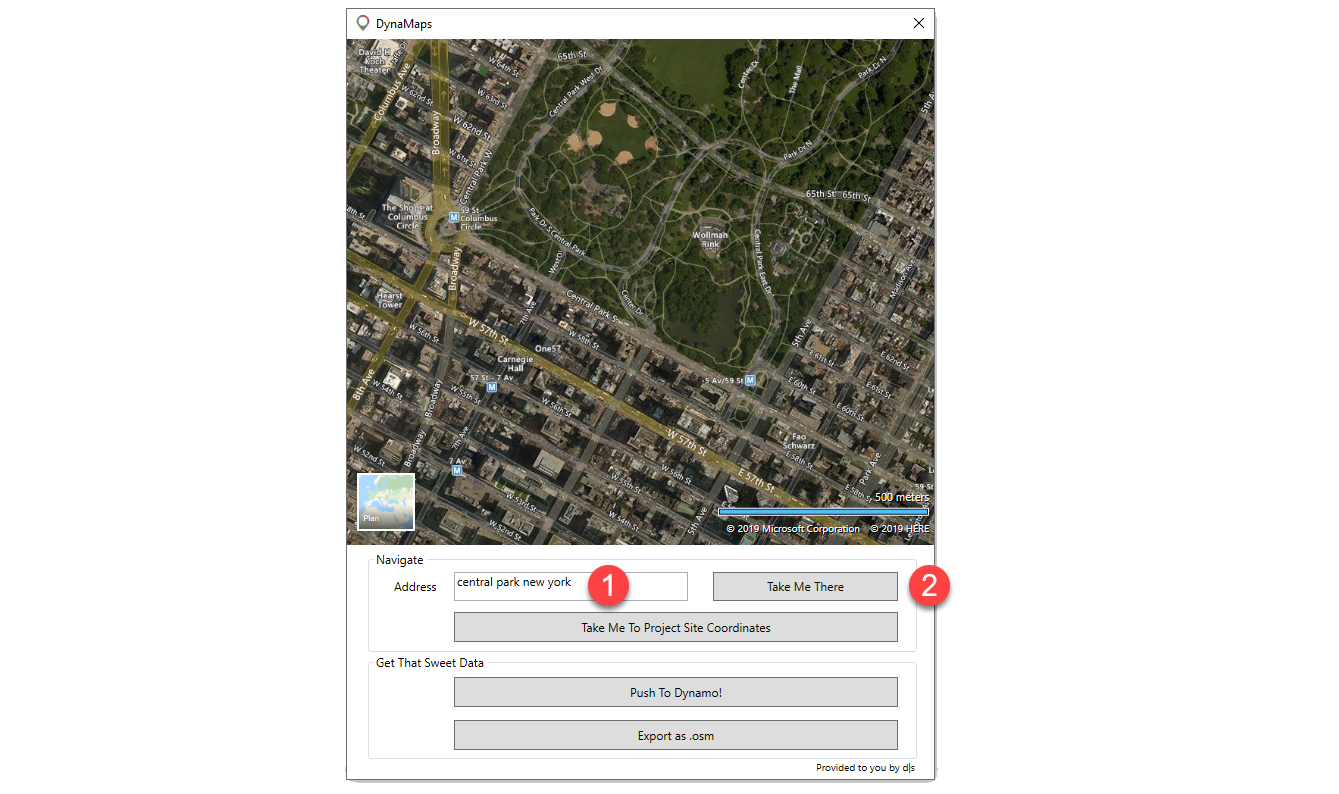
Open the DynaMaps view extension from the “View” tab of dynamo, enter your address (1) and press “Take Me There” (2). You can navigate the map just like in google maps, zoom in/zoom out and slide it. There’s even a satellite mode! 🙂
dynaGeom step 1

Note: if you have entered the latitude and longitude of your site, you may press “Take Me To Project Site Location”. That will automatically place the map on your project location point and all geometry will be brought in it’s correct location. The latitude and longitude need to be those of your project base point!

Step 2 : Pushing the data to dynamo

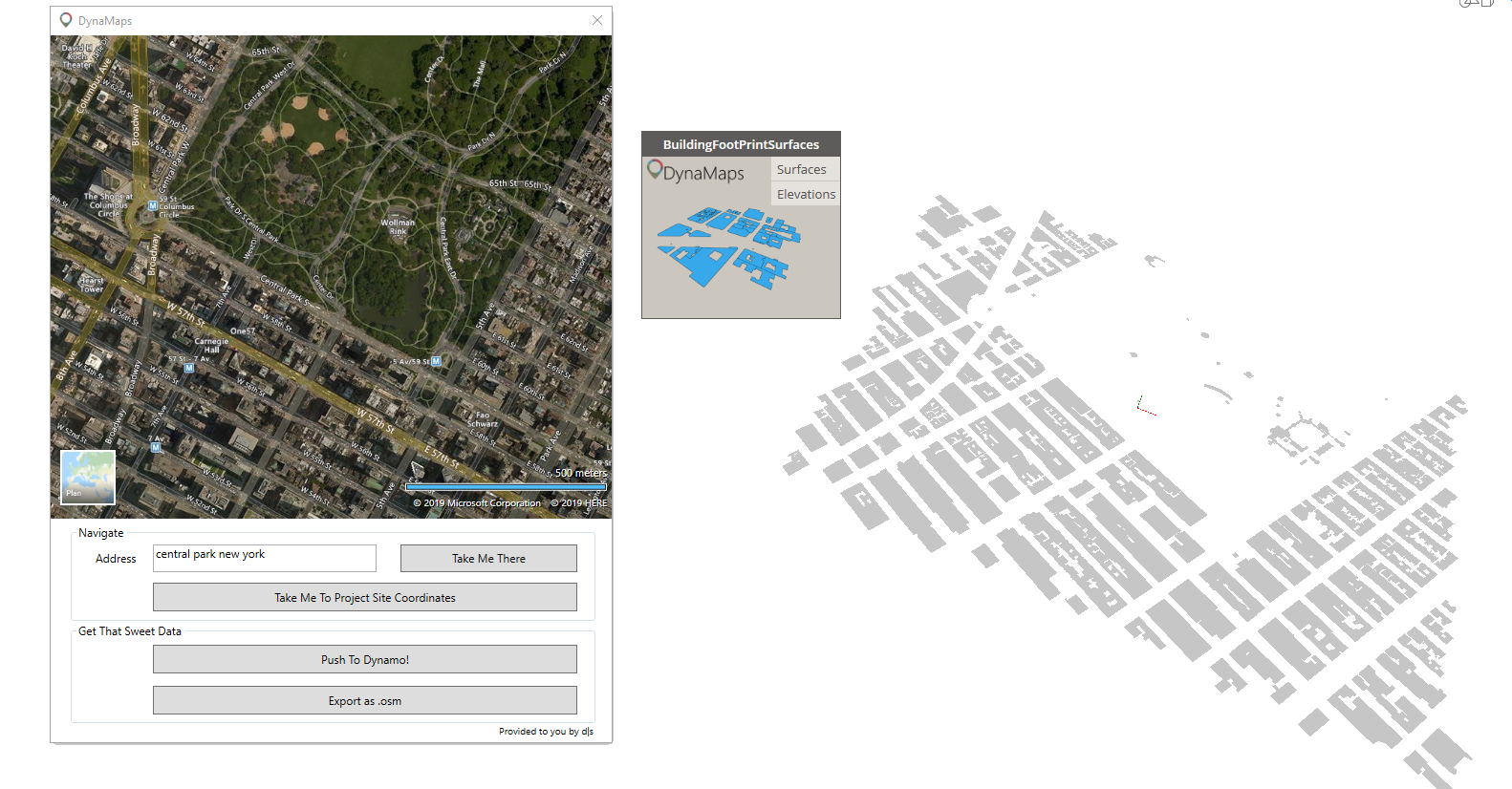
In this workflow, we’ll start by bringing the building footprints as surfaces. I order to do so, place the node on the canvass and press “Push To Dynamo” on the view extension. We recommand working in manual mode. If you didn’t get too crazy with the size of the area – which I kind of did here – it shouldn’t take too long for this to appear:
dynaGeom step 2

Step 3 : Getting the topography in Dynamo

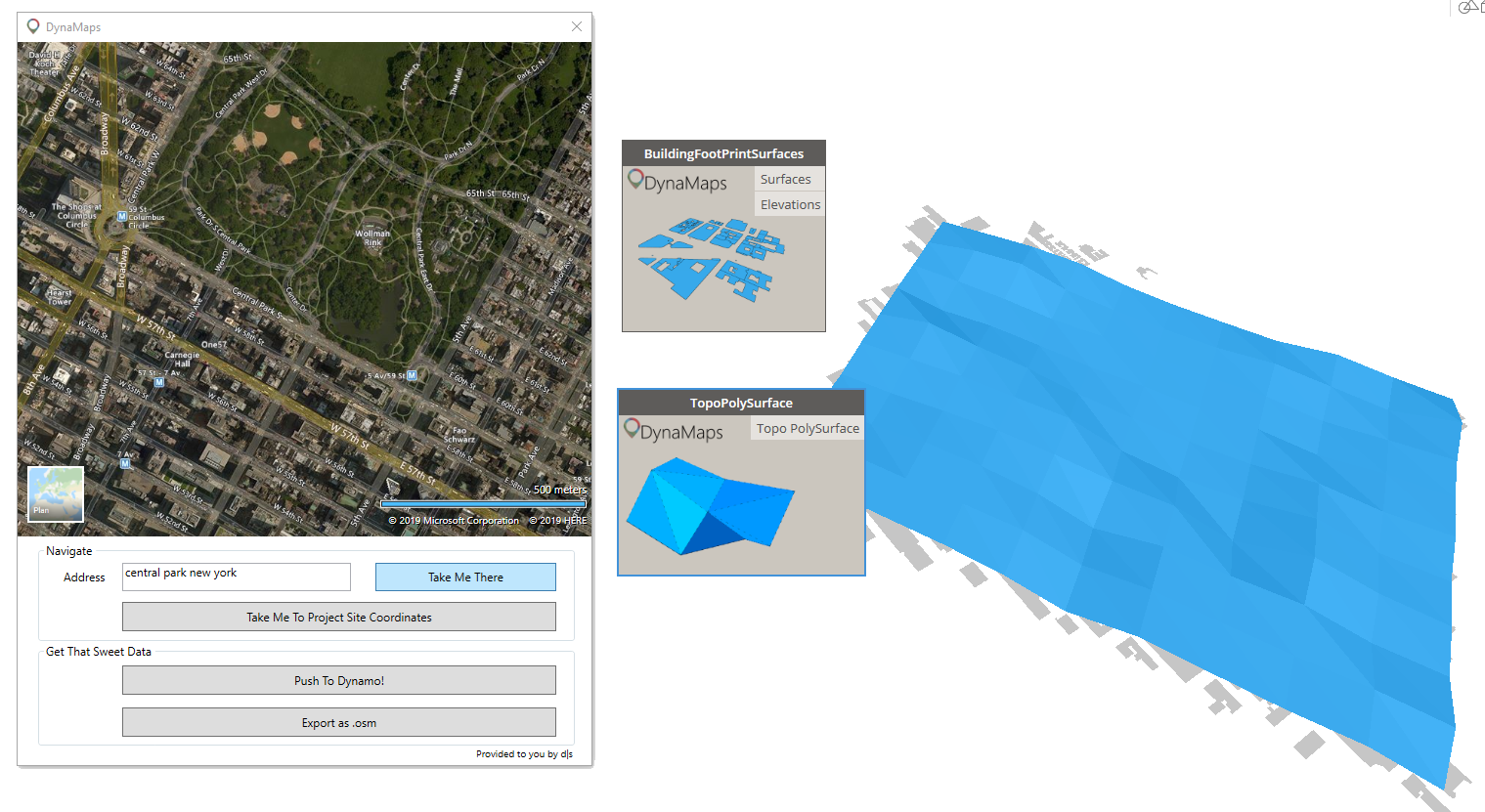
Getting the topography in dynamo using DynaMaps is very direct. All you need to do is place a TopoAsPolySurface or TopoPoints (depending on what you wish to do) and hit “execute”. The data is from Nasa’s SRTM.
dynaGeom step 3

Step 4 : Creating the buildings 3D geometry

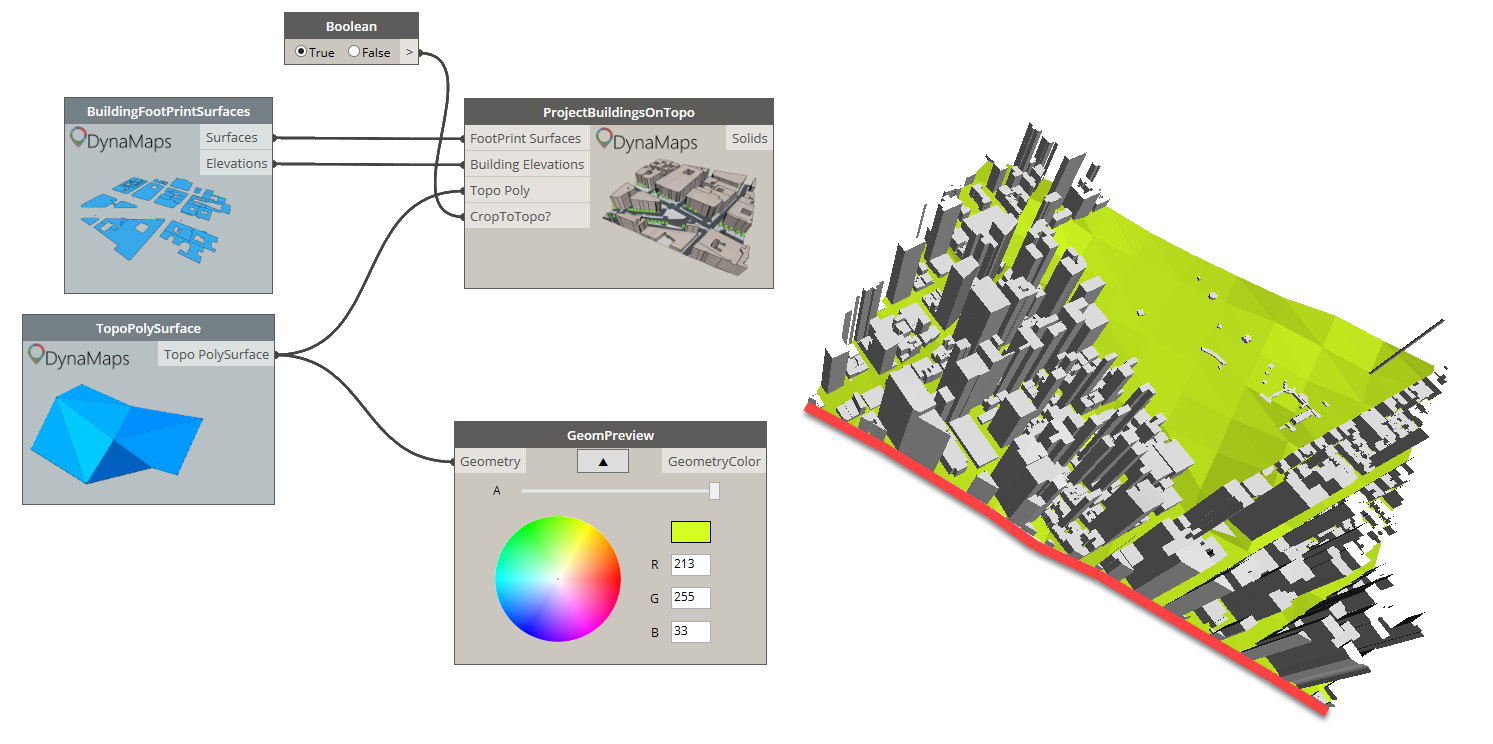
We will use another node from the DynaMaps Package to do so : “ProjectBuildingsOnTopo”. It will easilly create the 3D buildings and project them on the topography polysurface. The”CropToTopo” input is optional.  When it is set to true, it allows to crop the the buildings in order to have a clean square of site geometry. The height of the buildings if from open street map (when it has been made available). If a building doesn’t have height information, a random value between the minimum and maximimum building heights of the area will be assigned. I’ve had a suggestion to make it possible to enter a default value for all buildings with no height data (thank you Mark Ackerley 🙂 !). It will be implemented in the next release.

Note : the GeomPreview node is only used for visualization purposes. It is from the Data Shapes Package. Also, from that point you can close the DynaMaps view extension to free up some screen space as you only need to push the data once into dynamo.
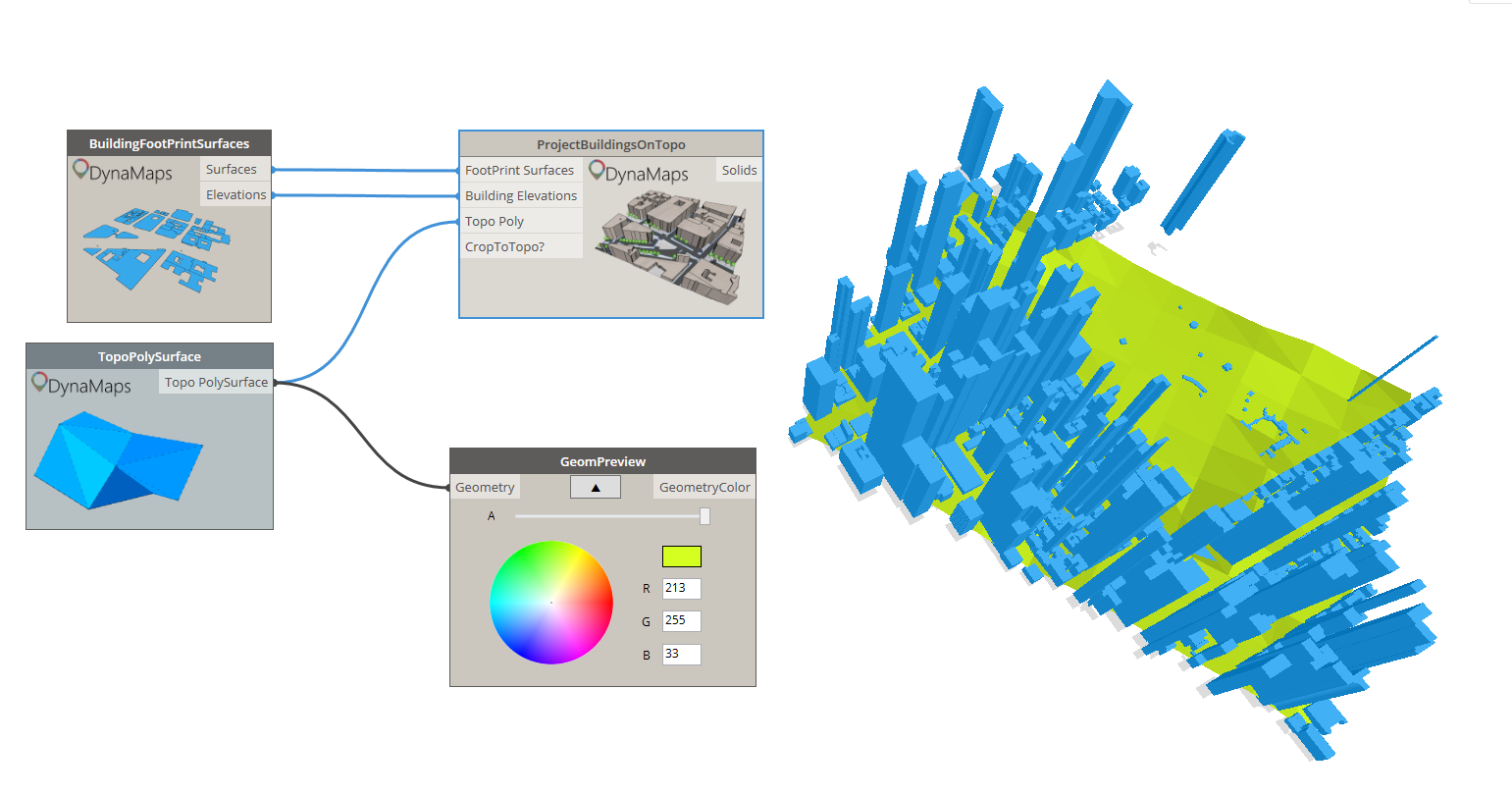
dynaGeom step 4
3D buildings projected on the topography polysurface
dynaGeom step 4-2
Notice the clean cut of the buildings when “CropToTopo” is set to true

Step 5 : Getting the road geometry

The starting point is the “RoasAsPolycurves” node from the Live category. It offers a list of all road types in open street map. You can select those you’re interested in and hit execute!
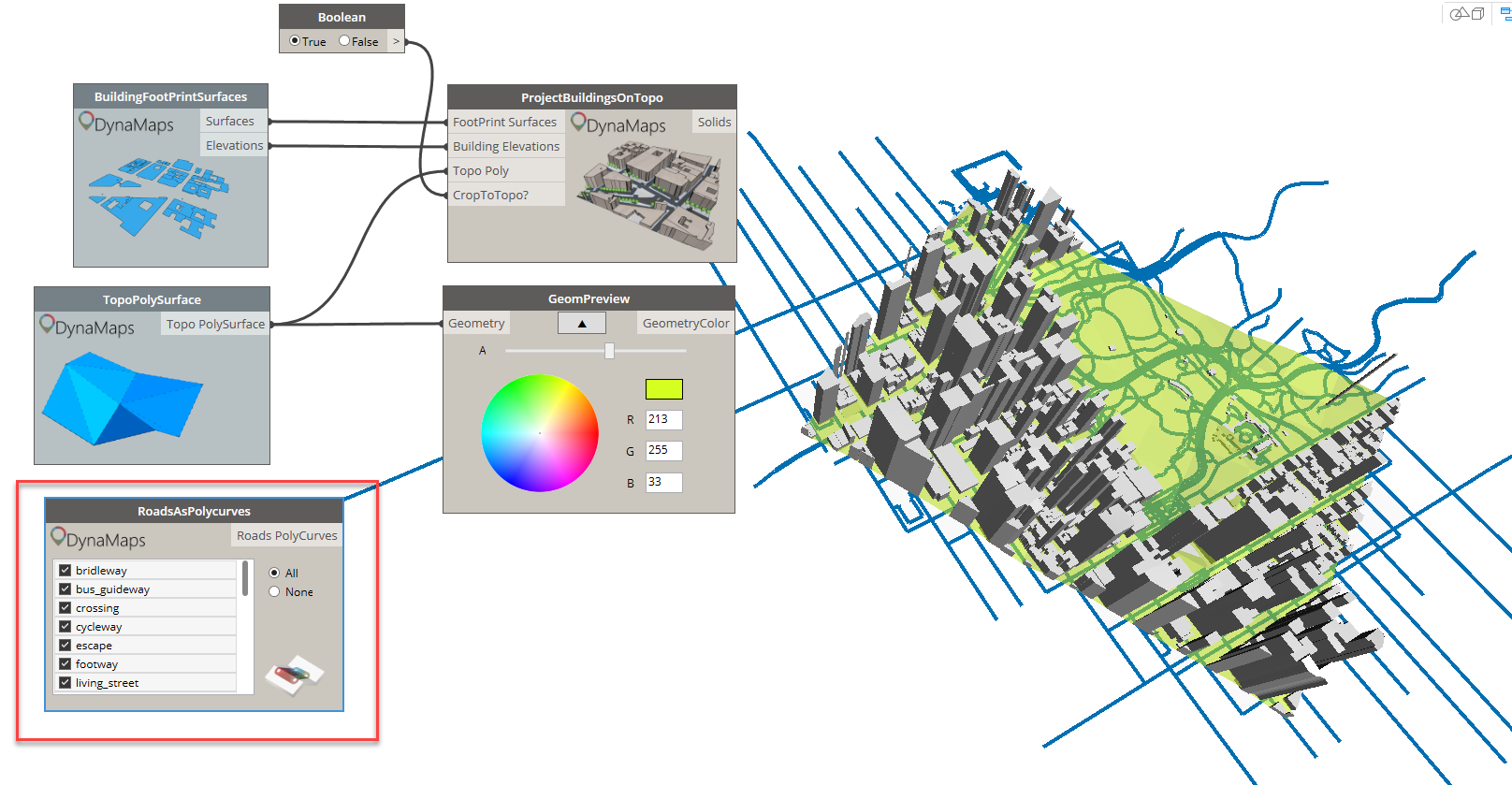
dynaGeom step 5

Those polycurves can be used to obtain surfaces, that can then be projected on the topo polysurface. The width of the roads has to be entered manually as there is very little useful data about it.
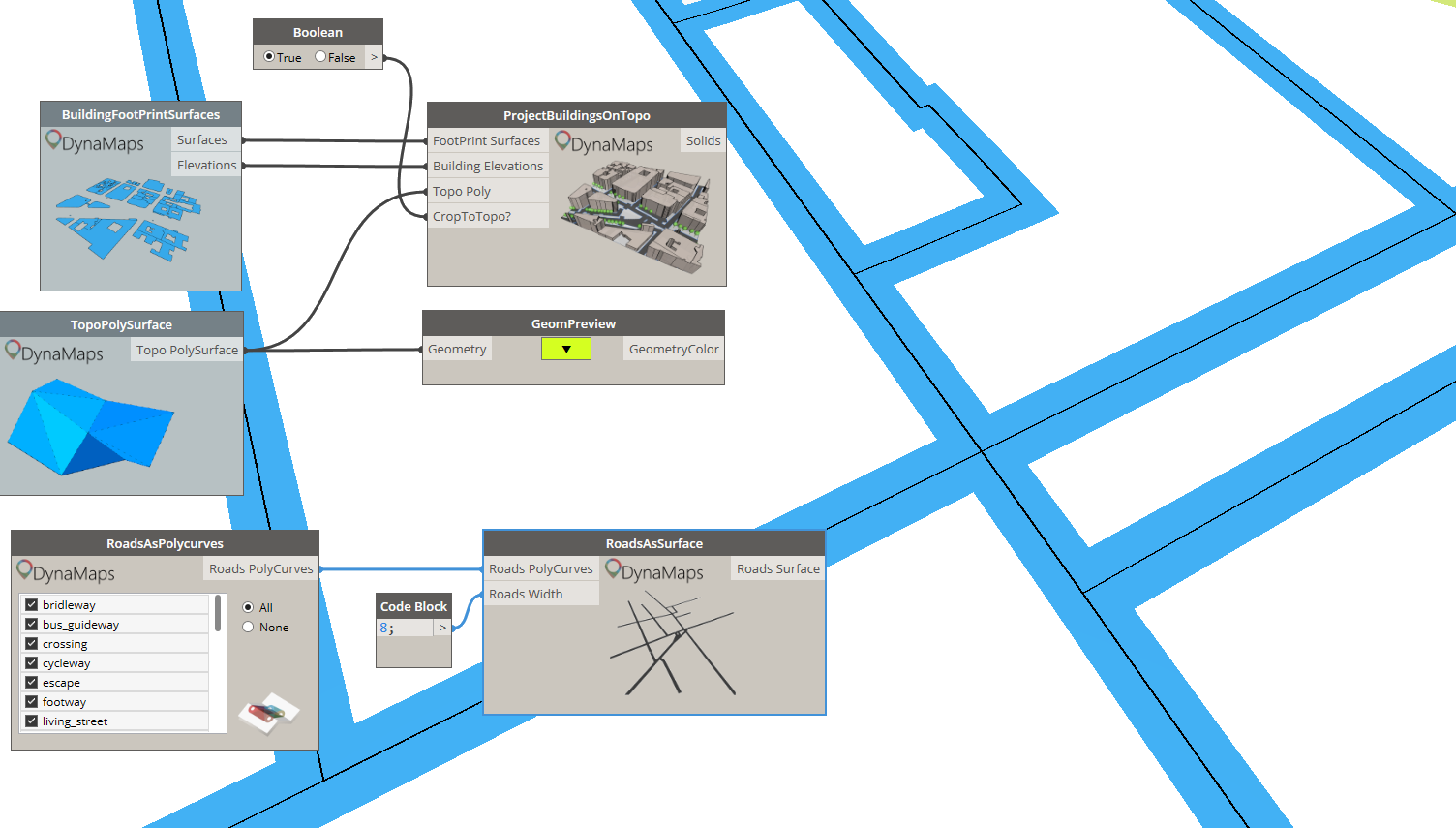
dynaGeom step 5-2
Generating road surface from polycurves using “RoadsAsSurface”

Projecting roads on the topography polysurface using the “ProjectRoadsOnTopo” node returns the projected roads as well as a trimmed topo polysurface. Those can be used and visualized separately.
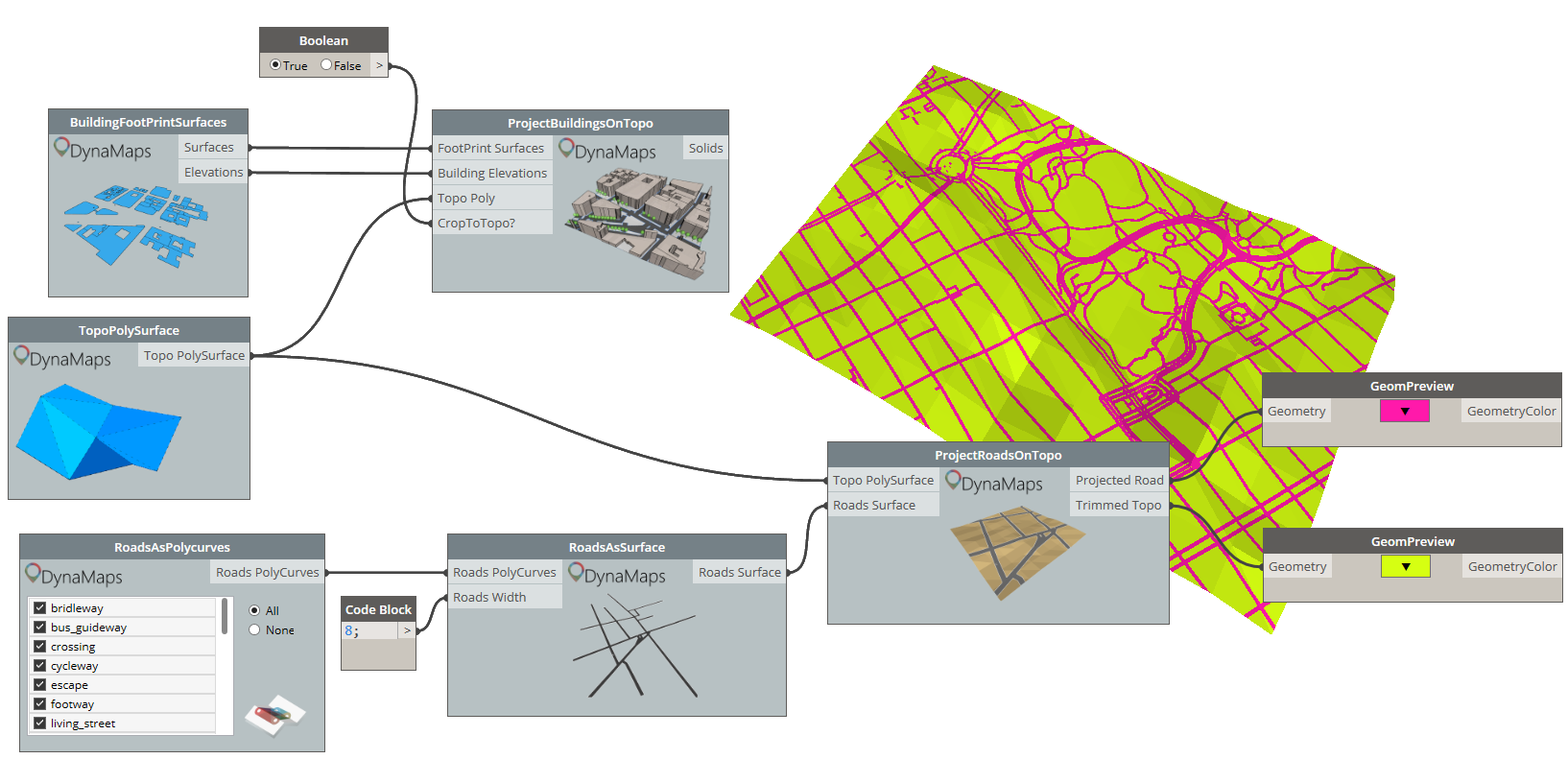
dynaGeom step 5-3

Step 6 : Trees!

Once again, the starting point will be one of the Live nodes : “TreePoints”. It will output the location of all the trees of the selected area as points. Those can then be projected onto the topo polysurface.
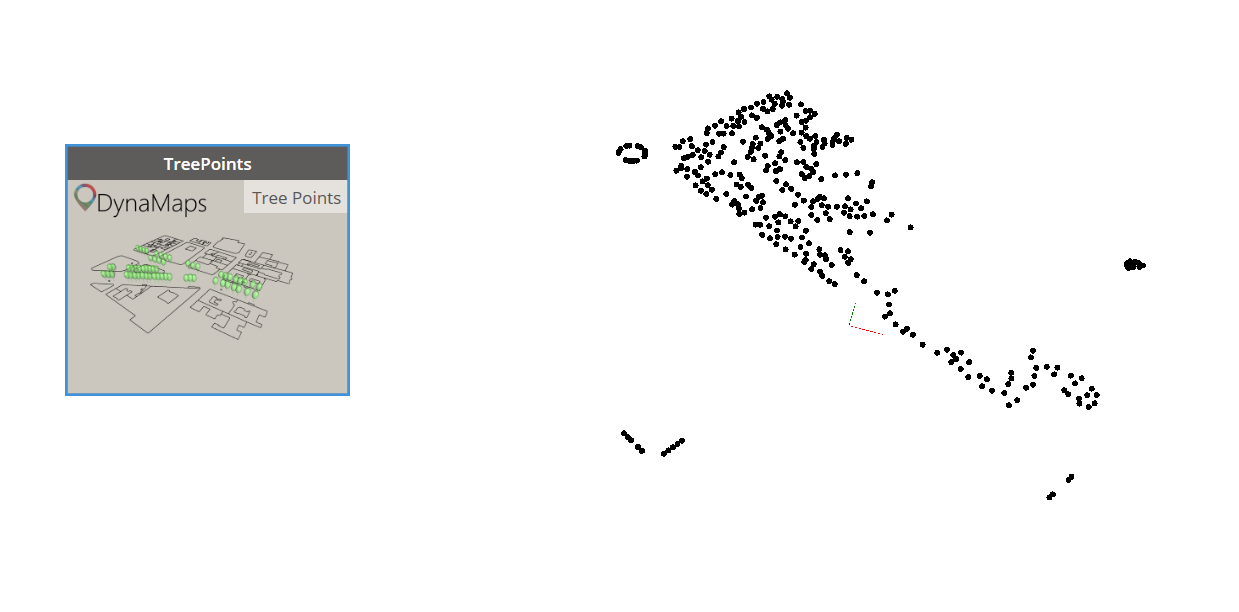
dynaGeom step 6
Trees as points
dynaGeom step 6-2
Projecting trees on the topo

And finally, just for the sake of having something aestetically pleasing, you can use the node “TreeByPoints” in order to have a little – very basic – tree geometry placed at each one of the projected points.
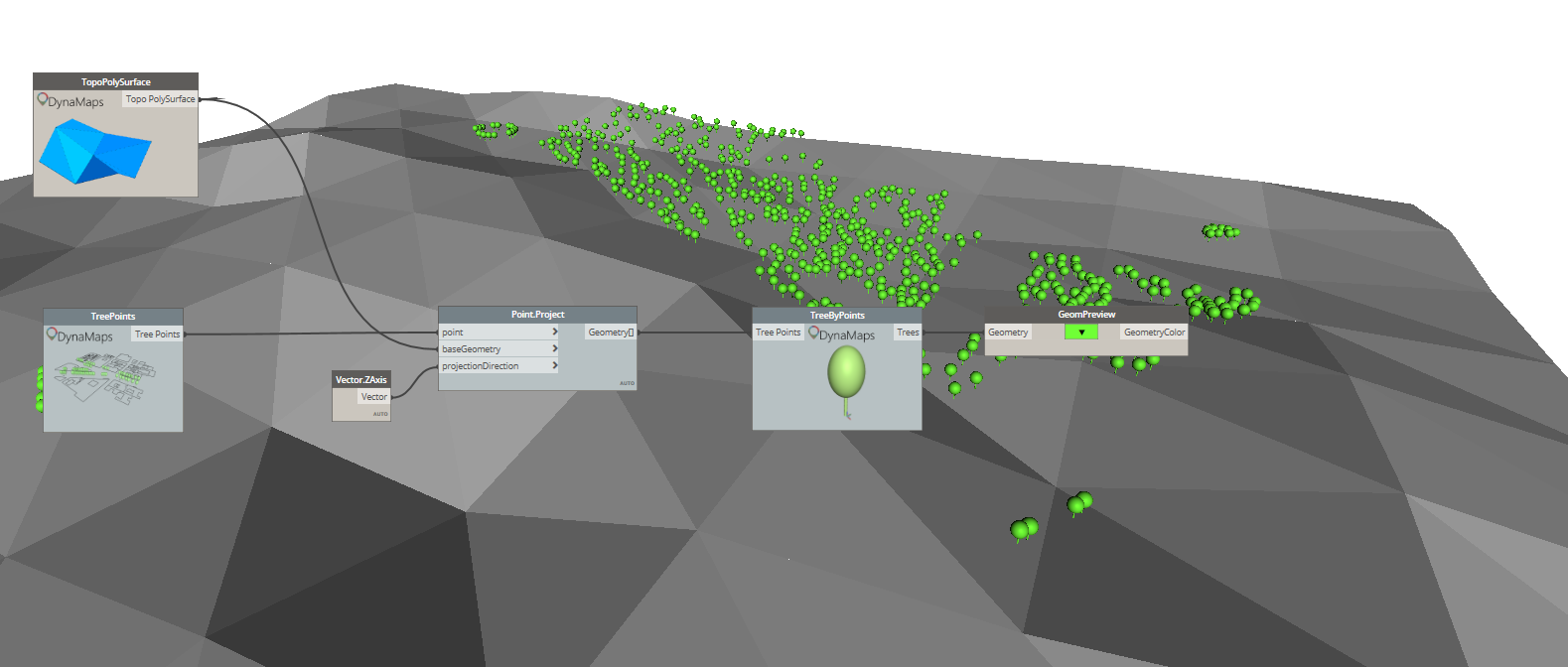
dynaGeom step 6-3

And that’s it! Here’s the general result :
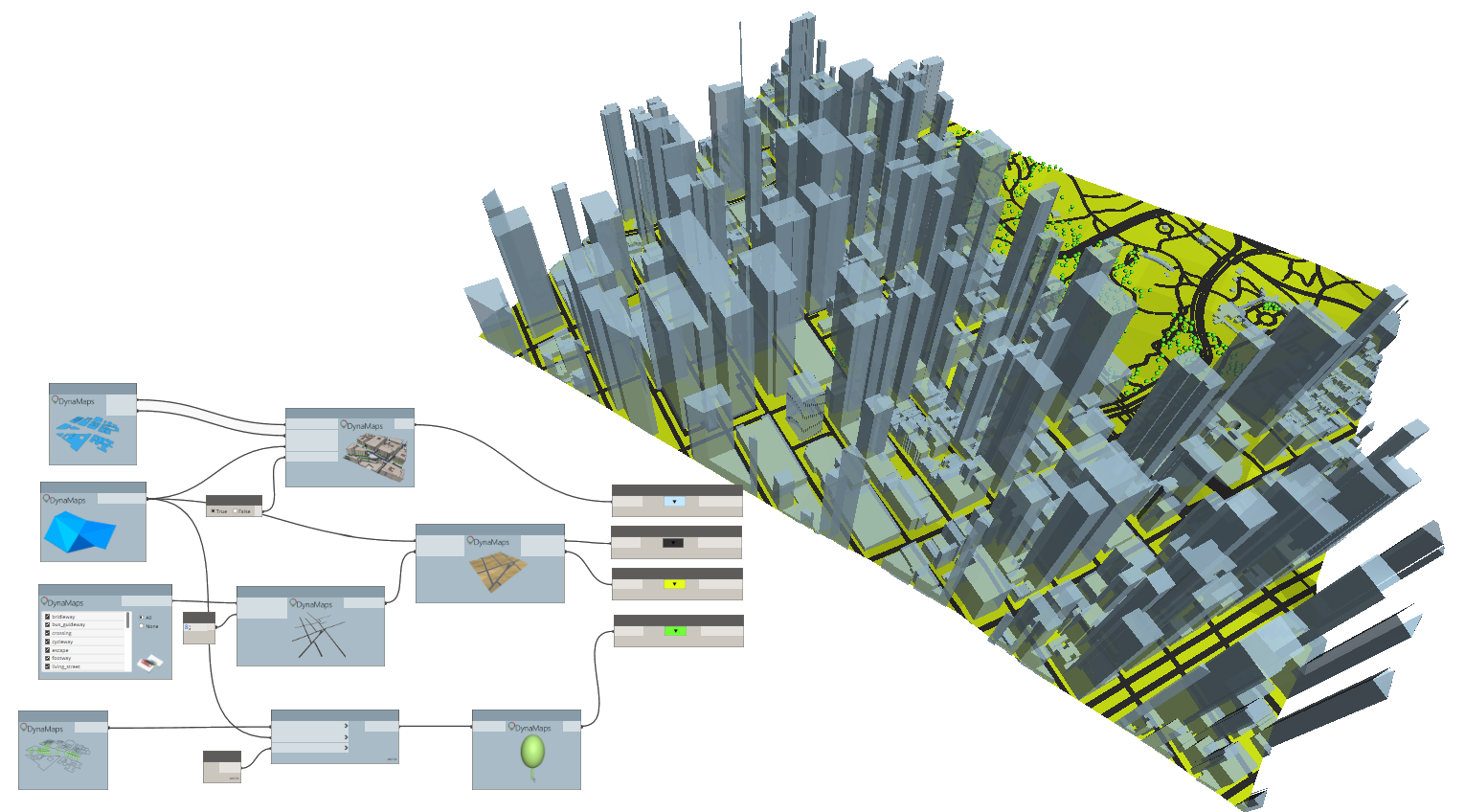
Final

Please feel free to comment on how you think this can be improved !


53 responses to “Getting All Site Geometry Inside Dynamo With DynaMaps”

  1. Nivaldo Curcio Avatar
    Nivaldo Curcio

    This is so great….. really impressive

    Liked by 1 person

  2. Marais Avatar
    Marais

    Incredible!

    Liked by 1 person

  3. nickjcurtis Avatar
    nickjcurtis

    Select from list of loaded Planting families, assign ratios for each family selected?

    Liked by 1 person

  4. Weekly Roundup – 2019.23 – The BIMsider – Revit news

    […] GETTING ALL SITE GEOMETRY INSIDE DYNAMO WITH DYNAMAPS […]

    Like

  5. Weekly Roundup – 2019.23 – The BIMsider Avatar
    Weekly Roundup – 2019.23 – The BIMsider

    […] GETTING ALL SITE GEOMETRY INSIDE DYNAMO WITH DYNAMAPS […]

    Like

  6. Ingwiller Quenin Avatar
    Ingwiller Quenin

    Unbelievable ! Great job ! I just have a question for you : Where we can find the nodes Geompreview ?

    Like

    1. data|shapes Avatar
      data|shapes

      Thanks for you message! 🙂 GeomPreview is in the Data-Shapes package

      Like

  7. Peter Avatar
    Peter

    Hey!
    How did you manage to get the map from DynaMaps to Dynamo? For me already the step number 2 with pushing the map to dynamo is not working and I’m not getting any site, just error which says: Warning: Internal error, please report: Dereferencing a non-pointer.

    Do you think you can help me out with this?

    Thanks a lot!

    Like

    1. data|shapes Avatar
      data|shapes

      Hi Peter! Thanks for your message. Can you please give more informations? What nodes are you using? What location are you working on?

      Like

      1. Thomas Corrie Avatar
        Thomas Corrie

        I get the same error when running in Dynamo Sandbox (2.0.2.6826), but it works fine for me in Dynamo for Revit (2.0.2.6833 on Revit 2019.2.1). It happens when I use the BuildingsFootPrintPolygons or BuildingFoorPrintSurfaces nodes after using Push to Dynamo! feature in the View Extension. I’ve tried it for different locations and I get the same result.
        Very nice package!

        Like

  8. leosolid28 Avatar
    leosolid28

    First of all, an excellent spectacular work.
    I can reduce the size of the polygons of the topography?

    Liked by 1 person

    1. data|shapes Avatar
      data|shapes

      Hi Leolosid,
      Thanks for your comment! 🙂
      So far the topography always returns a 10×10 grid. This limitation is due to the fact that the data is not free, everytime someone makes a request, some credit is used. I will definitely implement a way to make it possible to increase resolution but I haven’t decided how yet. It will either be through a patreon , so community funded, or I’ll start some service that can be subscribed to.
      I’ll write a post as soon as it’s up and running!

      Like

  9. Olimpia Avatar
    Olimpia

    Hello. How can I import all the geometry into the project in revit?

    Liked by 1 person

    1. data|shapes Avatar
      data|shapes

      A step by step tutorial to do so will be posted next week! stay tuned 🙂

      Like

  10. Rafael Tudor Avatar
    Rafael Tudor

    …pure awesomeness!!!!!!

    Like

  11. Dennis Avatar
    Dennis

    I am now trying to work out how to direct shape by family instance.
    Thoughts?

    Like

    1. data|shapes Avatar
      data|shapes

      Check out the “Revit” node in package. You might find what you’re after! 🙂 on new tutorial on how to do that will be up on the blog by the end of the week

      Like

      1. Scott D Davis Avatar
        Scott D Davis

        Looking for this blog post on getting the data to Revit, and I don’t see it? Has it been posted yet?

        Liked by 1 person

      2. data|shapes Avatar
        data|shapes

        It’s way behind.. 🙂 but on it’s way! It’ll be published this week for sure.

        Like

      3. data|shapes Avatar
        data|shapes
      4. data|shapes Avatar
        data|shapes

        Check out the new post!

        DynaMaps to Revit

        Like

  12. Nick Curtis Avatar
    Nick Curtis

    Extra Credit for an automated process to import as an image the Aerial Photo to scale into a Plan View.

    Liked by 1 person

    1. data|shapes Avatar
      data|shapes

      Awesome idea!

      Like

  13. martijn pellekaan Avatar
    martijn pellekaan

    The Dynamaps doesnt grab the elevations in the Netherlands? Do I miss a package, or does this have something to do with us being below sealevel? Lat.long (52.700730, 5.268900)

    Revit 2019 19.0.20.1
    Dynamo 2.0.1
    Package D|S Data-shapes 2019.2.30
    Package D|S Dynamaps 2019.2.14

    Like

    1. hardusdebruyn Avatar
      hardusdebruyn

      I’m having the same issue in New Zealand. The topography points are working perfectly but TopoPolySurface is returning a flat surface. It doesnt seem like there is a way to use anther surface for the RevitBuildings node.
      Revit 2019.2
      Dynamo 2.0.3
      Package D|S Dynamaps 2019.2.21

      Liked by 1 person

      1. data|shapes Avatar
        data|shapes

        Hi !
        Thanks for your comment!
        I believe I have located and fixed the issue? Could you please give it another shot and let me know how it goes ?

        Liked by 1 person

      2. hardusdebruyn Avatar
        hardusdebruyn

        Data shapes. Thank you so much. Works like a charm. Love your work. Is there any way of perhaps making a node to locate extract? This would enable me to use it in Dynamo Player and allow others in the office to use it. Really thank you.

        Liked by 1 person

      3. Sauron Sanchez Avatar
        Sauron Sanchez

        I am having this issue right now as well. The site is in Kenosha WI.
        Revit 2020.2
        Dynamo 2.3
        Dynamaps 2019.2.21

        Like

  14. Lelde Avatar
    Lelde

    This is so great!!!!Excellent work!
    Unfortunately im not able to project the roads on the toposurface. Im doing as said at step 5, but roads remains at the level 0. What could be the problem here?
    Thx a lot 🙂

    Like

    1. data|shapes Avatar
      data|shapes

      Hi Lelde! Thanks a lot for the kind words 🙂 what location are working on? I can give it a shot and see what might be going wrong

      Like

  15. Justyna Avatar
    Justyna

    Hi,
    I have imported BuildingFootprintSurfaces and TopoPolySurace. When I try to feed them to the ProjectBuildingsOnTopo node, I get warning:
    Unable to compute thickened face : LOP_OFF_BAD_OFFSET — offset null or will make body too thin or inside out.
    Any ideas why that could happen?

    Liked by 1 person

    1. data|shapes Avatar
      data|shapes

      Hi Justyna,
      Thanks for reporting. Can you please share the location you’re working on? This is obviously an issue with one of the geometric operations. Having your location would allow me to figure out which one.

      Like

      1. Justyna Avatar
        Justyna

        The location is Buckingham Street in Aylesbury, UK.

        Like

  16. Ash Avatar
    Ash

    Any update on the Roads as Surface node not working? Doesnt matter which size or location I try, I am constantly getting the “unable to compute thickened face” error.

    Like

    1. Rob Avatar
      Rob

      Same problem here with a different location
      any update?

      Like

  17. Daniel Sellam Avatar
    Daniel Sellam

    Hello Mostafa, What’s the best way to send the roads to Revit ?
    Tahnk you

    Like

    1. data|shapes Avatar
      data|shapes
  18. Mae Rickardsson Avatar
    Mae Rickardsson

    Great package! Thanks for the hardwork!
    I am having trouble with all the « project » nodes (to get roads or buildings onto the topo). I get the following error.

    « DynaMapsNodesFunctions.BuildingsOnTopo operation failed. Unable to compute thickened face : LOP_OFF_BAD_OFFSET — offset null or will make body too thin or inside out »

    Revit 2020
    Dynamo 2.1
    Package D|S Data-shapes 2019.2.30
    Package D|S Dynamaps 2019.2.14
    Location: Genarp, Sweden

    Like

  19. Kyle Avatar
    Kyle

    When I use the rads as surface function, I only get a surface within a small radius of the total area. Is there a way to fix this? I’ve tried several areas and am using the latest release of Dynamaps, though was also having the issue on older releases.

    Like

  20. Krzysztof Avatar
    Krzysztof

    Hi,
    I am very happy with your work, it makes the location plans so easy to create. I used it few times to test it out on randomly created project, but when I need it for the real thing (school project), it disappoints me with an error 😦
    Warning: DynaMapsNodesFunctions.BuildingsOnTopo operation failed.
    Unable to compute thickened face : LOP_OFF_BAD_OFFSET — offset null or will make body too thin or inside out
    I already saw a couple of guys commenting with the same warning, but didn’t really get the solution I guess.
    The address is:
    Montagehalsvej, 2500 København

    Like

    1. data|shapes Avatar
      data|shapes

      Hi Krzysztof,
      Thank you for your message!
      Can you take a look at the elevation list (from the building Footprint as polusurface node)? I’m pretty sure you’ll find some elevations equal to zero, which doesn’t allow for the extrusion creation. The 0 elevations are actually informations that are missing in OpenStreetMap, so the best thing to do is to go ahead and add them directly in OpenStreetMap. It’s super easy and will be available in DynaMaps immediately! Please let me know how it goes.

      Like

      1. Krzysztof Avatar
        Krzysztof

        Thank You for fast response! 🙂
        I checked out the elevation list and every single entry was missing 😦 I set all of them myself as you advised and now the node is working properly. But another issue came in to the game, a note ‘RoadsAsPolycurves’ is borken (?) and I guess, that results in ‘RoadsAsSurface’ giving a
        Warning: DynaMapsNodesFunctions.RoadsAsFlatSurface operation failed.
        Cannot Union an empty collection of solids

        I attach a link to visualize the broken node.

        Like

      2. Anthony Gene Kitsmiller Avatar
        Anthony Gene Kitsmiller

        Is this available yet, I’m having issues as well and I do not find much out there on the subject.
        Warning: DynaMapsNodesFunctions.BuildingsOnTopo operation failed.
        Unable to compute thickened face : LOP_OFF_BAD_OFFSET — offset null or will make body too thin or inside out
        Warning: DynaMapsNodesFunctions.ProjectRoadOnTopo operation failed.
        Value cannot be null.
        Parameter name: source
        Warning: DynaMapsNodesFunctions.RoadsAsFlatSurface operation failed.
        Unable to compute thickened face : THICKEN_FAILED — failure in thicken sheet

        Like

    2. Krzysztof Avatar
      Krzysztof

      Hej,
      I managed to get that node working, but a new error occured in RoadsAsSurface node
      Warning: DynaMapsNodesFunctions.RoadsAsFlatSurface operation failed.
      Unable to compute thickened face : THICKEN_FAILED — failure in thicken sheet
      Any idea what might be a problem ?

      Like

  21. Jeremy Avatar
    Jeremy

    This is so cool, Just a couple things below 🙂

    I’m struggling to find the Geompreview in your Datashapes package, got the most updated version byt cant find it.

    Also getting these errors for project buildings on topo
    Warning: DynaMapsNodesFunctions.BuildingsOnTopo operation failed.
    Unable to compute thickened face : LOP_OFF_BAD_OFFSET — offset null or will make body too thin or inside out

    Like

    1. Jeremy Avatar
      Jeremy

      sorry read through other coments

      Like

  22. Chefic Avatar
    Chefic

    So nice and wonderful

    Like

  23. Chiel Vlutters Avatar
    Chiel Vlutters

    Hello nice work on the package.
    I got a problem when i try to load in the toposurface. The toposurface floats above the roads and buildings. Anyone got a clue to how i can change this. I am a Dynamo noob btw.

    Thanks for your time in advance

    Like

  24. JohnB Avatar
    JohnB

    Awesome package! I tried it today and was amazed how it works. Considering I was using Meerkat for grasshopper ebfore, this is much more easier.
    I just had a some errors that I encountered. The topography and road seems to be on a different level whenever I push it to Dynamo. Is this normal and do I just adjust it whenever I import it to revit? Buildings and topo are on same level floating above the roads and building footprint.

    Like

  25. mhmtbdr Avatar
    mhmtbdr

    I just getting this error « DynaMapsNodesFunctions.BuildingsOnTopo operation failed.
    Unable to compute thickened face : ACIS_EXCEPTION_ACCESS_VIOLATION — Access violation »

    Like

  26. Andrea Rolle Avatar
    Andrea Rolle

    Hello,

    Is the plugin creating a zmap with exact coordinates? In order to be linked in revit “by shared coordinates” I mean.

    Thanks

    Andrea

    Like

  27. Farshid Avatar
    Farshid

    Hi,
    I am troubled by getting the “RoadsAsSurface” node to work. No matter where I set the location I always end up with the following error.

    I do appreciate any suggestions or workarounds.

    Regards,
    Farshid

    Like

  28. Andrew Yeh Avatar
    Andrew Yeh

    Good Morning,

    first, thank you so much for sharing your knowledge to all of us.
    and, i running into some error when i tried to get the « RevitBuilding » to extrusion for site.

    the error message; « The input argument extrusionDist must be positive.
    Parameter name: extrusionDist »

    Location: Mansfield TX
    Revit Version: 21.0.0.383
    Dynamo Version: 2.5.0.7460

    Like

Leave a reply to Krzysztof Cancel reply

This site uses Akismet to reduce spam. Learn how your comment data is processed.

Latest Articles